πŸ“œ Contributions by @agora@botsin.space at [[notes]]
Agora nodes contain community contributions with titles or topics that match your search. x
πŸ“œ File notes.md by @agora@botsin.space β˜† πŸ“Ž β›Ά

Loading pushes...

✨ AI Synthesis Mistral Gemini ChatGPT Claude x

Expanding this section will automatically generate an AI synthesis of the contributions in this node.

πŸ“š Agora node [[2004 11 28 fotobuzz like flickr notes]] (pulled by the Agora)
πŸ“œ File _posts/archive/2004-11-28-fotobuzz-like-flickr-notes.md by @bmann β˜† πŸ“Ž

layout: post title: FotoBuzz — like Flickr notes created: 1101697091 categories:

  • Drupal
  • Web 2.0
  • Web Development

The Gush developers have created something very similar to Flickr’s notes capability:

We’ve released a web utility called FotoBuzz which allows you to annotate JPEGs using Flash on the client side and PHP/Python on the server-side. It’s dirt easy to integrate into existing webpages. After including some CSS and JavaScript in the HTML head, all you have to do is add a single attribute to the image tag and it will do the rest for you. Going Nowhere: FotoBuzz viewlet

Of course I have to think about putting this into Drupal somehow. Along with integrating Flickr directly (Jonas — get off your ass and release that code!), this should do nicely.

πŸ“š Agora node [[20200617233631 how_to_take_smart_notes]] (pulled by the Agora)
πŸ“œ File literature/20200617233631-how_to_take_smart_notes.org by @ryan β˜† πŸ“Ž

This book is the definitive guide for the Zettelkasten method. This note is an index note.

Ideas

  • Going forward I think all of my notes will require all of my notes to have an "ideas" section with references to text above where applicable

    • Could I do this using footnotes?

πŸ“š Agora node [[20200711013059 literature_notes]] (pulled by the Agora)
πŸ“œ File 20200711013059-literature_notes.org by @ryan β˜† πŸ“Ž

Literature notes are references to ideas.

They should be structured like "on page x it says y". They can just be highlights too.

πŸ“š Agora node [[20200712110654 three_types_of_notes]] (pulled by the Agora)
πŸ“œ File literature/20200712110654-three_types_of_notes.org by @ryan β˜† πŸ“Ž

Notes

These were mentioned earlier, but deserve some more elaboration.

  • Fleeting notes :: Temporary reminders of information

  • Permanent notes :: Contain necessary information in a /permanently understandable way/. These should be so well-developed that they could be inserted into a publication.

  • Project notes :: Notes which are relevant only to a specific project. Kept in a project-specific place

    • In org-roam's case, perhaps a (writing) project could contain it's own roam note.

    • Project notes can be:

      • comments in the manuscript

      • collections of project-related literature

      • outlines

      • snippets of drafts

      • reminders

      • to-do lists

      • publication drafts

πŸ“š Agora node [[2021 02 20 indiekit articles notes]] (pulled by the Agora)
πŸ“œ File _logs/2021-02-20-indiekit-articles-notes.md by @bmann β˜† πŸ“Ž

Well, everything is working, but need to figure a few things out. I used [[iA Writer]] to post to the site and it works! I’ve made Article post types into what I call Notes here, the main post type.

Posting from [[Quill]] as an Article isn’t going to work1, since it turns everything into HTML and escapes the square brackets in [[wikilinks]].

For the (Micropub) Notes post type, I’ve created a new kind called [[Logs]]. They use the current date stamp as their filename, and I made a temporary logs page to display them.

So, I can post arbitarily long Notes posts with Markdown formatting and wikilinks. This could replace my manual Journal entries. Instead, I would auto-generate journal pages per day (not sure if this is possible), or maybe just show the last N days of logs on a main journal page.2

  1. That is, the Micropub Article type, which is meant to be long form and HTML.↩

  2. As of 2021-02-22, I’m calling this log type a journal, and in fact merging the journal posts I made before into the logs category.↩

πŸ“š Agora node [[adding timestamps to org roam notes]] (pulled by the Agora)
πŸ“œ File adding-timestamps-to-org-roam-notes.md by @neil β˜† πŸ“Ž οΈπŸ”— ✍️

Adding timestamps to org-roam notesΒ§

Adding timestamps at note creationΒ§

From Zaeph’s config, include this in your capture template:

:head "#+TITLE: ${title}\n#+CREATED: %U\n#+LAST_MODIFIED: %U\n\n"

Modifying timestamps on saveΒ§

I would prefer to do this on org-roam files only. See Update a field (#+LASTMODIFIED: ) at save - How To - Org-roam.

Didn’t work for me straight off though.

(setq time-stamp-active t
      time-stamp-start "#\\+LAST_MODIFIED:[ \t]*"
      time-stamp-end "$"
      time-stamp-format "\[%04y-%02m-%02d %3a %02H:%02M\]")
(add-hook 'before-save-hook 'time-stamp nil)
πŸ“š Agora node [[c end user programming enables people to bulk process notes]] (pulled by the Agora)
πŸ“œ File content/C- End user programming enables people to bulk process notes.md by @scalingsynthesis β˜† πŸ“Ž οΈπŸ”— ✍️

Authored By:: [[P- Rob Haisfield]]

Bulk processing is basically what computation was made for! We can see promising directions with [[map, filter, and reduce]].

With respect to [[refactoring tools]], I want to be able to bulk type / categorize notes in hindsight. Through the [[Jump]] model, you would [[select through search and manual addition and subtraction]], then apply some refactoring to all of them.

Bulk processing is incredibly powerful to address the question of [[adapting user patterns over time]] if we treat [[I- Search as a primitive]].

For example, [[P- Joel Chan]] developed a [[Discourse Graph Plugin]] that enabled him to follow a structure where different notes had types (claim, question, evidence, source), whereas previously he followed the Zettelkasten method. Because he followed a personal convention of "Z: " in the title of all of his claims, he was able to search for all notes that followed the convention to give himself a list to process so that he could update his past notes to his current system. In a system that puts end-user programming first as I suggest, he would be able to take that list and [[map a command]] to change the titles.

In the past, I followed a system where I would tag all of my question pages with #question and my claims with #claim. As you can see in this notebook, I’ve changed my strategy to involve prefixing the titles of the notes. This enables me quick access within autocomplete while also reducing the friction to create structure, as this does not require me to even open the page after I’ve created it. The same principle applies here, where I know how to specify a query that would bring my old notes in that followed a specific convention, and I could process them all in bulk.

The problem becomes more difficult in situations where the user has no prior convention and wants to add one. For example, now I prefix the page titles for people, and before I did not. This means I have no query that can find all people in my graph. Here is where [[AI might help]]. It might be able to perform named entity recognition and find pages that likely represent people. Many users we interviewed had a pattern where they would mark their meeting notes with a link to [[meeting notes]], so perhaps the language model could narrow its searches to pages mentioned within meeting notes pages.

So as a general claim, this problem can be solved if we can identify a queryable consistent pattern. We often find that, even if it doesn’t feel like we have a prior convention, there is something consistent about what we did before. Either the user or the system can identify that consistency.

πŸ“š Agora node [[c people naturally try to enact typed distinctions in their notes]] (pulled by the Agora)
πŸ“œ File content/C- People naturally try to enact typed distinctions in their notes.md by @scalingsynthesis β˜† πŸ“Ž οΈπŸ”— ✍️

Authored by:: [[P- Joel Chan]]

πŸ“š Agora node [[changing the filename that org roam gives new notes]] (pulled by the Agora)
πŸ“œ File changing-the-filename-that-org-roam-gives-new-notes.md by @neil β˜† πŸ“Ž οΈπŸ”— ✍️

Changing the filename that org-roam gives new notesΒ§

πŸ“œ File changing-the-filename-that-org-roam-gives-new-notes.md by @patterning β˜† πŸ“Ž

hallo

πŸ“œ File stoa-test-2/changing-the-filename-that-org-roam-gives-new-notes.md by @agora β˜† πŸ“Ž

hallo

πŸ“œ File stoa-test/changing-the-filename-that-org-roam-gives-new-notes.md by @agora β˜† πŸ“Ž

hallo

πŸ“œ File changing-the-filename-that-org-roam-gives-new-notes.md by @anonymous@doc.anagora.org β˜† πŸ“Ž ✍️

hallo

πŸ“š Agora node [[collection of notes]] (pulled by the Agora)
πŸ“œ File collection of notes.md by @flancian β˜† πŸ“Ž οΈπŸ”— ✍️
πŸ“š Agora node [[convertible notes]] (pulled by the Agora)
πŸ“œ File Convertible Notes.md by @dr_kvj β˜† πŸ“Ž

What does it allow us to do ?Β§

  • It can let me invest into Codex without having to valuate and decide on the equity for now
  • It lets us wait until the [[priced round]] when another investor would want to invest with a certain valuation in mind.
  • At that point , the convertible notes get triggered and hence the first investor gets the [[Shares]] before the new investor .

How does it compensate for the higher risk that the early investor took ?Β§

  • It gives interest on the provided investment and also a discount on valutation .
  • These both are to be agreed upon before closing the deal on the convertible notes
  • General , interest rate is 5-6% , while the discount could be from 10-25%
    • More on this at https://youtu.be/njx09wXb9o0?t=623
    • Ex : if i invested 10k $ , if the priced round happens after one year , my investment would be evaluated as 10.5 -10.6 k , rather than the original 10k and also if the [[valuation of the company]] is at 1 M $ , for me it would be valuated only at 75k $ .

Limitation :Β§

  • This wouldn’t compensate enough for the risk , the early investor took , if there is a very high valuation and if the initial investment was small (comparitively)
  • Solution -> Putting a cap on maximum valuation !
  • β₯… [[Screenshot 2020-11-20 at 12.50.18 PM.png]]

What happens if company doesn’t grow ?Β§

to research :Β§

  1. CAFE ^e2be26
  2. SAFE ^66a514
πŸ“š Agora node [[crafting the information you capture in main notes]] (pulled by the Agora)
πŸ“œ File crafting-the-information-you-capture-in-main-notes.md by @neil β˜† πŸ“Ž οΈπŸ”— ✍️

Crafting the Information You Capture in Main NotesΒ§

An : [[article]]

Found at : https://writing.bobdoto.computer/crafting-the-information-you-capture-in-main-notes/

Written by : [[Bob Doto]]

On crafting [[main note]]s in [[zettelkasten]].

The description of different [[types of information]] is very interesting.

As a way of avoiding calling every main note a ‘claim’ - which is kind of what I’ve been doing, insofar as I’ve been doing zettelkasten.

πŸ“š Agora node [[daily notes]] (pulled by the Agora)
πŸ“œ File daily notes.md by @ajhalili2006-old β˜† πŸ“Ž οΈπŸ”— ✍️

List of [[ajhalili2006]]‘s daily note entries, updated on daily basis (depending on how many times I push fresh commits and fetched by https://anagora.org

πŸ“œ File docs/features/daily-notes.md by @gyuri β˜† πŸ“Ž

Daily NotesΒ§

Daily notes allow you to quickly create and access notes for today.

Try it out, run the Foam: Open Daily Note command.

Shortcuts and SnippetsΒ§

You can quickly open today’s daily note by pressing alt+d. You can also automatically open today’s note via the Foam β€Ί Open Daily Note: On Startup setting.

You can also quickly create link to your daily notes, in the configured format, using snippets.

Type /today and press enter to link to today’s note. You can also write:

Snippet Date
/tomorrow tomorrow
/yesterday yesterday
/monday next monday
/+1d tomorrow
/-3d 3 days ago
/+1w in a week
/-1m one month ago
/+1y in one year

You get the idea ;)

ConfigurationΒ§

It’s possible to customize path and heading of your daily notes, by following the dateformat masking syntax. The following properties can be used:

  "foam.openDailyNote.directory": "journal",
  "foam.openDailyNote.filenameFormat": "'daily-note'-yyyy-mm-dd",
  "foam.openDailyNote.fileExtension": "mdx",
  "foam.openDailyNote.titleFormat": "'Journal Entry, ' dddd, mmmm d",

The above configuration would create a file journal/daily-note-2020-07-25.mdx, with the heading Journal Entry, Sunday, July 25.

πŸ“š Agora node [[developernotes]] (pulled by the Agora)
πŸ“œ File DeveloperNotes.md by @agora@botsin.space β˜† πŸ“Ž
πŸ“š Agora node [[evergreen notes]] (pulled by the Agora)
πŸ“œ File Evergreen notes.md by @goldfishlaser β˜† πŸ“Ž οΈπŸ”—

Evergreen notesΒ§

Core ideaΒ§

  • Atomic (one concept, one note)
  • Concept oriented
  • Densely linked
  • Have associative ontology
  • Revised over time
πŸ“œ File evergreen-notes.md by @neil β˜† πŸ“Ž οΈπŸ”— ✍️

Evergreen notesΒ§

Evergreen notes are written and organized to evolve, contribute, and accumulate over time, across projects.

– Evergreen notes

I first came across this term on Andy Matuschak’s notes: https://notes.andymatuschak.org/Evergreen_notes. Andy coined the term, in this context at least.

Andy Matuschak proposed the term Evergreen Notes to describe a system of note-taking that aspires towards cumulative personal knowledge, rather than simply information capture.

ResourcesΒ§

πŸ“š Agora node [[flancia meet notes]] (pulled by the Agora)
πŸ“œ File flancia meet notes.md by @flancian β˜† πŸ“Ž οΈπŸ”— ✍️

[[2022-01-29]]Β§

[[2022-01-22]]Β§

[[2022-01-15]]Β§

πŸ“š Agora node [[fleeting notes]] (pulled by the Agora)
πŸ“œ File fleeting-notes.md by @neil β˜† πŸ“Ž οΈπŸ”— ✍️

Fleeting notesΒ§

Fleeting notes are all the ideas that pop into your head throughout the day, that you capture and maybe turn into something more concrete.

Most people capture these kind of ephemeral notes. The specific term ‘fleeting notes’ is from [[Zettelkasten]] I believe, where they’re given a bit more purpose.

These are all the ideas that pop into your mind. Always have a notebook or a note taking app with you to capture these. They can be very shortβ€”just one word for instance. The goal is just to remember them for a very short amount of time, until you can sit down and write a proper note

– How to take smart notes - Ness Labs

You should have an easy way to capture them. See [[How I capture fleeting notes]].

πŸ“š Agora node [[fleetingnotes]] (pulled by the Agora)
πŸ“œ File FleetingNotes.md by @agora@botsin.space β˜† πŸ“Ž
πŸ“š Agora node [[getting knowledge maps in to my weeknotes]] (pulled by the Agora)
πŸ“œ File getting-knowledge-maps-in-to-my-weeknotes.md by @neil β˜† πŸ“Ž οΈπŸ”— ✍️

getting knowledge maps in to my weeknotesΒ§

Why? a) To give me a visual aide memoire of the week notes. b) To give others a more visual entry point in to my digital garden.

I started with very visual and very time consuming slides made in LibreOffice Impress. See: [[Captain’s Log]]. I still really like those, but I couldn’t find the time to make them each week.

Then I fiddled a little bit with [[PlantUML]]. Marginally less work than building from scratch, but still time-consuming, having to write the PlantUML markup. Good fun, but if I’m spending actual real time on it, I’d rather the creation process itself be visual and free-flowing.

Next up I’ve been trying graphs built automatically with org-roam-graph. I put the links to the daily journals in the weeknotes file, generate the graph, have a peruse of it and write my weeknotes from then. Then remove the journal links and just generate the graph from the weeknote links. It works as a nice easy-to-generate visual aide memoire for me, though sadly it’s not really very visually compelling for anyone else.

πŸ“š Agora node [[handwritten notes]] (pulled by the Agora)
πŸ“œ File Handwritten Notes.md by @an_agora@twitter.com β˜† πŸ“Ž
πŸ“š Agora node [[how i capture fleeting notes]] (pulled by the Agora)
πŸ“œ File how-i-capture-fleeting-notes.md by @neil β˜† πŸ“Ž οΈπŸ”— ✍️

How I capture fleeting notesΒ§

If I’m at my computer, I capture with org-capture in [[Emacs]]. They go into an Inbox org file.

If I’m somewhere else, I capture into [[orgzly]] on my phone. Either using orgzly’s quick note capture via the new note permanent notification, or via a share from another app (e.g. highlighted text).

These go into my Inbox Mobile org file.

I process those notebooks regularly. Things that are ‘things to do’ I move to somewhere else in my org files. Fleeting notes that are relevant to my outer garden I move them to a Fleeting notes org file. This stops them clogging up my todo system.

Then periodically I’ll go through the fleeting notes file and process them. I might add them to today’s journal page, or straight into a reference note in the garden, or maybe even straight into a main note.

πŸ“š Agora node [[how i take notes]] (pulled by the Agora)
πŸ“œ File how-i-take-notes.md by @neil β˜† πŸ“Ž οΈπŸ”— ✍️

How I take notesΒ§

When I’m taking some notes on something, I kind of do it like this:

  • Write a few sentences on what I already think about it first, before reading anything specifically elsewhere.
  • The ‘subjective’ view: see what’s been written on it by people I already have a mental model of. Probably quote a bunch from these.
    • Friends/comrades: check in Anagora, see what’s been written there
    • ‘Mentors’: [[Free, Fair and Alive]] / https://patternlanguage.commoning.wiki / [[Lean Logic]]
    • Counterpoints: not sure where to get these from in garden form right now, but basically people I know will probably not agree. Posting on social media is usually a good way of getting some antithesis action.
  • The ‘objective’ view: Wikipedia.
    • Maybe quote a bit just for understanding, but not too much from here. No point trying to recreate an objective view.
  • Synthesis
    • Actually - just leave it there if time’s up for now. That’s fine. Can come back to it.
    • Otherwise, try and synthesise it to understand.

Thinking about this, I want certain circles/groupings of people. e.g. for politics I’d probably go to FFA, P2P wiki, some peeps on Anagora, etc

For other stuff (let’s say knowledge management), I’d probably go to [[Phil Jones]], [[Bill Seitz]], some Anagora peeps, etc

πŸ“š Agora node [[how to take smart notes]] (pulled by the Agora)
πŸ“œ File book notes/How to Take Smart Notes.md by @bbchase β˜† πŸ“Ž

SΓΆnke Ahrens Copyright Β© 2017

Quotes:

β€œNotes on paper, or on a computer screen […] do not make contemporary physics or other kinds of intellectual endeavor easier, they make it possible … no matter how internal processes are implemented […you..] need to understand the extent to which the mind is reliant upon external scaffolding.” (Levy 2011, 270)

β€œOne cannot think without writing.” (Luhmann 1992, 53)

πŸ“œ File How to Take Smart Notes.md by @binnyva β˜† πŸ“Ž

How to Take Smart NotesΒ§

Context: This is notes made from the book ‘How to Take Smart Notes’ by S Ahrens - Website of the Book

Of all the writing, most people focus only on the writing the lengthy pieces, a book or article. The process of writing starts early - the actual writing of the paper is only a small part of the entire process.

Its easy to make bad notes - there is no immediate negative consequence to it.

Dunning-Krueger Effect: People who don’t know much think of themselves as experts Impostor Syndrome: People who are experts think they don’t know much.

Step by Step Process

  1. Make Fleeting notes: Just a easy way to capture every idea that pops into your head. This can be discarded when permanent notes are made.
  2. Make Literature Notes: Every time you consume content, make notes on it. Whatever you want to remember or use later. Keep it short, very selective and use your own words.
  3. Make Permanent Notes: Does the new information contradict, correct, support or add to your existing content? Can you combine it with existing content to create something new? What questions are triggered?
    • Write one idea per note.
    • Write as if you are writing for someone else - use full sentences, show sources.
    • Be precise, clear and brief
    • Should be understood even if you don’t know the context it was taken from.

Zettelkasten is an external scaffold for thinking.

If you can rephrase something in your own words, you have understood it.

Many times, its the simplicity of an idea that makes it powerful.

Zettelkasten can lose its value when notes are added indiscriminately - each note should be worthy of publishing.

Project Notes: Project specific notes that can be deleted/archived at end of project. Includes…

  • Comments in the manuscript
  • Collection of project related literature
  • Outlines
  • Drafts, Snippets
  • Reminders
  • Todo lists

Fixed Mindset: Fear and avoid feedback - at it might damage their positive self image. Growth Mindset: Actively seek and welcome feedback(positive and negative). Exposes yourself to new challenges and possible learnings from failures.

6 Steps to Successful WritingΒ§

  1. Give each task your undivided attention. Our attention span has come down - because of many sources of distraction.
  2. Multitasking is not a good idea.
  3. Give each task the right kind of attention

Focused Attention: Focus on one thing only - sustained only for a very small time(few seconds) Sustained Attention: Stay focused on one task for a longer period - necessary to learn, understand or get things done.

"On one hand, those with wandering defocused, childlike minds seem to be the most creative;on the other, it seems to be analysis and application that’s important. … creative people need both - the key to creativity is being able to switch between a wide-open, playful mind and a narrow analytical frame"

  1. Become an expert instead of a planner. Without the rigid structure of a plan, you have to draw from decisions on what to do from experience - getting better over time. Mere-exposure Effect: Doing something many times makes us believe that we are good at it - independent of our actual skill.
  2. Get Closure. Get things out of your mind by writing it down. [[Zeigarnik Effect]]: Open tasks tend to occupy our short-term memory - until they are done. We get distracted by unfinished tasks. But if we write them down, brain considers it done.
  3. Reduce the number of decisions.

"Ego Depletion: Temporary reduction in the capacity or willingness to engage in volitional action(controlling the environment, controlling self, making choices, initiating action) caused by prior exercise of volition"

Reliable and standardized working environment is less taxing on our attention, concentration and willpower.

Breaks are crucial for learning - it allows the brain to process information and move it to long term memory

Read for UnderstandingΒ§

  1. Read with pen in hand/Have note taking capability
  2. Keep an Open mind When going thru content, we should look for dis-confirming arguments an facts that challenge our way of thinking. But we are naturally drawn to everything that confirms what we already believe. When we decide on a hypothesis, our brains automatically look for supporting data. [[Confirmation Bias]]

Zettelkasten solves this by changing the initiative from finding confirming facts to an indiscriminate gathering of any relevant information regardless of the argument it will support.

  1. Get the Gist The practice of extracting notes and permanent notes makes us better in reading and understanding text. This gives you the ability to spot patterns, see the frames used - and lets you think critically and look at the assertions made by the text. To put this knowledge to use, you must be able to reframe questions, assertions and information.

  2. Learn to Read You have understood something only if you can explain it to someone else. Permanent notes are a micro version of this ‘explaining’. This will reveal the gaps in our understanding. Re-reading the text will not do this - it will give you a fake "I already know that" feeling due to [[Mere-Exposure Effect]]

  3. Learn By Reading

Take Smart NotesΒ§

A good metric for productivity would be: number of permanent notes / day. Aim for 3.

Think outside the brain: When we think, the brain will overlook the issues in the thought - it will auto fill the gaps in our understanding. But when we write it down, these issues becomes very apparent.

We rewrite our memory every time we try to retrieve it. Brain always try to find meanings, patterns and connections between things - even if there is none.

Two measurements for memory…

  • Storage Strength
  • Retrieval Strength

Elaboration: Connecting information to other information in a meaningful way. This is a very successful learning method.

Useful learning connects a piece of information to as many meaningful contexts as possible - so any of those contexts can be used to retrieve the information.

Develop IdeasΒ§

Tags should be created and assigned based on what you are interested in or working on - not just based on the content of the note.

When working with the Slip-box, we retrieve old ideas and connect them with new ideas - this is the recommended way to learn.

We learn things when…

  1. connecting new things to prior knowledge
  2. understanding broader implications(elaboration)
  3. Retrieve it at different times(spacing)
  4. use in different contexts(variation)
  5. retrieval with help of chance(contextual interference)
  6. Retrieval with deliberate effort

TagsΒ§

#book #notes #literature-notes #zettelkasten

πŸ“œ File how-to-take-smart-notes.md by @neil β˜† πŸ“Ž οΈπŸ”— ✍️

How To Take Smart NotesΒ§

A book on note-taking from [[SΓΆnke Ahrens]].

β₯… [[2020-07-04_09-12-21_screenshot.png]]

Mainly about breaking down ideas into smaller reusable chunks. Let them have free form structure. Have a good way to pull them back together again when you need them.

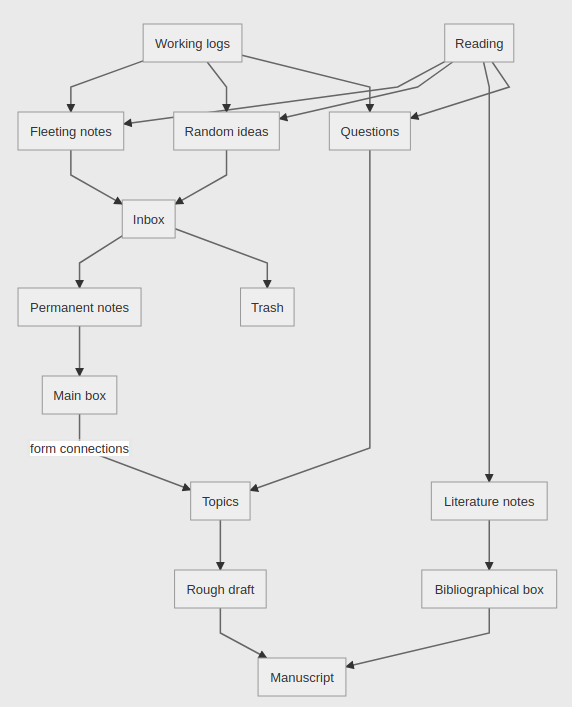
The gist of the system is:

  • While reading, make notes using your own words. Only when we’ve actually understood the material can we express it in our own words
  • Link these notes with other notes that could be related β€” this helps uncover patterns. Forming these connections also helps our memory, and recall becomes easier in the correct context

– Prateek Saxena

β₯… [[2020-07-04_09-07-20_screenshot.png]]

Diagram of the smart notes flow, from Prateek Saxena

we will be able to β€œefficiently turn our thoughts and discoveries into convincing written pieces and build up a treasure of smart and interconnected notes along the way.”

sounds good.

He wrote only on one side of each card to eliminate the need to flip them over, and he limited himself to one idea per card so they could be referenced individually.

– How To Take Smart Notes: 10 Principles to Revolutionize Your Note-Taking and …

  1. Principle #1: Writing is not the outcome of thinking; it is the medium in which thinking takes place
  2. Principle #2: Do your work as if writing is the only thing that matters (I like the focus on writing)
  3. Principle #3: Nobody ever starts from scratch
  4. Principle #4: Our tools and techniques are only as valuable as the workflow
  5. Principle #5: Standardization enables creativity. "Notes are like shipping containers for ideas" I like that.
  6. Principle #6: Our work only gets better when exposed to high-quality feedback
  7. Principle #7: Work on multiple, simultaneous projects
  8. Principle #8: Organize your notes by context, not by topic
  9. Principle #9: Always follow the most interesting path
  10. Principle #10: Save contradictory ideas

"By standardizing and streamlining both the format of our notes and the steps by which we process them, the real work can come to the forefront: thinking, reflecting, writing, discussing, testing, and sharing. This is the work that adds value, and now we have the time to do it more effectively."

true

"Writers don’t think about a single, β€œcorrect” location for a piece of information. They deal in β€œscraps” which can often be repurposed and reused elsewhere. The discarded byproducts from one piece of writing may become the essential pillars of the next one. The slip-box is a thinking tool, not an encyclopedia, so completeness is not important."

πŸ“š Agora node [[html notes]] (pulled by the Agora)
πŸ“œ File HTML Notes.md by @evan β˜† πŸ“Ž πŸ€—

HTML NotesΒ§

[[toc]]

AlignmentΒ§

Z-IndexΒ§

position:Β§

For z-index to work additionally the background must have some positioning (usually position: relative)

(relatively) absolute positioningΒ§

Advanced Positioning Tutorial | HTML & CSS Is Hard (internetingishard.com)

Coordinates for absolute elements are always relative to the closest container that is a positioned element. It only falls back to being relative to the browser when none of its ancestors are positioned. So, if we change .item-absolute’s parent element to be relatively positioned, it should appear in the top-left corner of that element instead of the browser window.

.item-absolute {
  position: absolute;
}
.absolute {
  position: relative;
}

The .absolute div is laid out with the normal flow of the page, and we can manually move around our .item-absolute wherever we need to. This is great, because if we want to alter the normal flow of the container, say, for a mobile layout, any absolutely positioned elements will automatically move with it.

DesignΒ§

ColorΒ§

DefaultsΒ§

It’s important to know that divisions often appear white because the default color of the body is also white. It’s important to remember that they’re transparent unless you specify the background property. This came up when I believed that z-index wasn’t working properly and I assumed that the index didn’t apply to background colors.

Also seeΒ§

[[Regex Magic]]

πŸ“š Agora node [[implementing littlefoot for footnotes]] (pulled by the Agora)
πŸ“œ File _notes/implementing-littlefoot-for-footnotes.md by @bmann β˜† πŸ“Ž

Following the [[Littlefoot]] instructions on a standard [[Jekyll]] / [[Markdown]] powered site that supports footnotes will pretty much make it just work.

πŸ“š Agora node [[linux day to day notes]] (pulled by the Agora)
πŸ“œ File linux-day-to-day-notes.md by @neil β˜† πŸ“Ž οΈπŸ”— ✍️

Linux day to day notesΒ§

Disk usageΒ§

Chromium disk usageΒ§

I just noticed that Chromium (which I very rarely use) was taking up 1.3GB of space in my .config folder.

Here’s how to clean that up: disk usage - Why does Chromium take up 1 GB in my .config and can I reduce th…

Odd that it was taking up so much space, given that my daily driver is Firefox.

Composer disk usageΒ§

composer clearcache

aptΒ§

sudo apt-get clean
sudo apt-get autoremove && sudo apt-get autoclean

Sorting by file sizeΒ§

I keep on running low on space. Disk Usage Analyzer is OK, but for the command line:

du -hs * | sort -h

The -h in both commands is for ‘human readable’.

dust is better though.

Trimming a video from my phone so I can upload it up to SignalΒ§

Signal has a 100M upload limit. Plus it’d take ages to upload.

This does the job pretty simply, still good enough quality for sending as a message and reduces the filesize massively:

ffmpeg -i input.mkv -vf "scale=iw/2:ih/2" half_the_frame_size.mkv

https://unix.stackexchange.com/a/447521

Shrinking images off my phone for web uploadΒ§

Quick command to shrink images from my camera for uploading to the web.

mogrify -auto-orient -resize 25% *.jpg

Finding out which security updates need installing on a serverΒ§

sudo unattended-upgrade -v --dry-run

https://askubuntu.com/a/832648/10271

Killing a process treeΒ§

I seem to need to be doing this more lately on php artisan serve.

Appears to be lots of ways of doing it: https://stackoverflow.com/questions/392022/whats-the-best-way-to-send-a-signal-to-all-members-of-a-process-group

All falling in to the category of https://xkcd.com/1168/

pkill one works OK for me:

ps x | grep 8000
# gives me some process ids, pick the one at the top
pkill -TERM -P <pid>

ls loveΒ§

Sort by modified time, in reverse:

ls -ltr

gitΒ§

find first time a bit of text was added in a repoΒ§

git log -S <search string> --source --all

https://stackoverflow.com/a/5816177/206297

πŸ“š Agora node [[listen notes]] (pulled by the Agora)
πŸ“œ File listen-notes.md by @neil β˜† πŸ“Ž οΈπŸ”— ✍️

Listen NotesΒ§

πŸ“š Agora node [[literature notes]] (pulled by the Agora)
πŸ“œ File literature-notes.md by @neil β˜† πŸ“Ž οΈπŸ”— ✍️

Literature notesΒ§

See [[Reference notes]].

Whenever you read something interesting, take notes of the main points. Always write these main points in your own words: don’t copy and paste and be very selective with quotes, which can sometimes hide our lack of understanding of a text

– How to take smart notes - Ness Labs

πŸ“œ File Literature Notes.md by @seph β˜† πŸ“Ž

This is where I keep notes that are specifically taken from single sources. I plan to I use them as references to claims.

πŸ“š Agora node [[macronotes]] (pulled by the Agora)
πŸ“œ File pages/MacroNotes.org by @jakeisnt β˜† πŸ“Ž

haskell doesnt work macros involve evaluation: running program at compile time requires running language inside compiler places burden inside of language implementation to make life tricky erlang vm has always supported continuously evaluating new code, unlike haskell, which has to have a very strange embedded interpreter to work properly! ghc templates might work better with better multi stage compilation?

macros in ruby are interesting: https://www.toptal.com/ruby/ruby-metaprogramming-cooler-than-it-sounds

πŸ“š Agora node [[markdown notes]] (pulled by the Agora)
πŸ“œ File _notes/markdown-notes.md by @bmann β˜† πŸ“Ž

Markdown Notes is one of the [[Foam]] recommended extensions for [[VSCode]].

For reference, my settings. These are kept in .vscode/settings.json.

  "vscodeMarkdownNotes.newNoteDirectory": "_notes",
  "vscodeMarkdownNotes.newNoteTemplate": "---\ntitle: ${noteName}\n---\n"

Which results in front matter being created that looks like:


---

title: Full Note Name

---

πŸ“š Agora node [[mathew's render notes]] (pulled by the Agora)
πŸ“œ File Mathew's Render Notes.md by @rel8 β˜† πŸ“Ž οΈπŸ”— ✍️

Mathew’s Render NotesΒ§

I decided to try scribing one of the Betaworx Render sessions (specifically: the #Plexus demo) using Obsidian, and try publishing it via GitHub. Context here. Hopefully [[Jerry Michalski]] will allow me to simply commit it to the Rel8 wiki ;)

Plexus founder Davey Morse starts with a good question that I don’t hear nearly enough in this space: What will it take for the things we’re building here to have an impact out there, on people who aren’t coders, researchers or productivity experts?

(My answer, FWIW: a lot, including a self-sustaining business model and a commitment to the lambda user I don’t see a lot of around here.)

The background to this question is that none of his friends thought the first 2 note-taking tools he built were worth the effort. They didn’t see what he could see. Sounds familiar.

Plexus was launched for the Render conference Now, a few days later, an OpenAI outage stymied my revisit - a shame. Anyway, the idea is simple:

  • post your thoughts into a defined shared brain on Plexus - eg : https://render.plexus.earth/
  • the AI surfaces relevant thoughts from other people in the same shared brain
  • you can dis/agree
  • if you agree that the surfaced thought you "pin" it
  • you can even email the author

As he pointed out, everywhere you go - as long as you’re not in the desert - you see all those potential life-changing connections between pairs of people which are not happening. He believes AI is the answer, but I fear it’ll be gamed just like everything else (SEO, hashtags).

My first reaction at the time: https://twitter.com/mathewlowry/status/1560359969865797633 - my first online community was for a 2002 physical conference, so the first thing I saw was a mobile app for visitors exploring physical spaces like conferences, exhibitions. Just add a "meet me here" button, and the online and offline networking would be brilliantly complementary.

They’re open to pilots. I could easily imagine trying this out here in Brussels.

πŸ“š Agora node [[p grow a digital garden with chosen obsidian notes]] (pulled by the Agora)
πŸ“œ File P- Grow a digital garden with chosen Obsidian notes.md by @plantey β˜† πŸ“Ž

Project: Grow a digital garden with chosen Obsidian notesΒ§


How to Make Obsidian Sync to a GitHub-Based Digital GardenΒ§

A work-in-progress section for how you can do this. The result of my labors that you can benefit from.

The Folder Thing

  1. Make a folder in Obsidian called "Garden" (or whatever you want to call it).

The Tech Upload Thing 3. Download a hefty handful of software - VS Code — for writing code… (is this even necessary?) - Git — for doing the upload thing - … 4. figure out how to use it… 5. Download this or that a code snippet… 6. Windows task scheduler…

How It’s GoingΒ§

This is where I’m publicly logging things.


These were my general goals and completion criteria for this project.

Objective: Craft a digital garden that syncs to my website from a folder in Obsidian.

Key results (KR)

  1. Easy way to put an Obsidian note in a "public" folder -> Not perfect, but good enough for now. Ideally, I’d just be able to write #public in a note and that would do the trick, but I’ll do it by hand until I figure out how to do that.
  2. Regularly commit and push this folder to GitHub [[How to use GitHub]]
    • Basically, "commit and push" are programmer speak for adding things into a digital project. For my purposes, what it means is that anything that changed about the specific stuff in the "public" folder will change on the web, and any changes will be made. Think of it as copy-pasting the "public" folder from my computer to wherever my digital garden is on the web
    • For now, I got

11-10-2020Β§

Now: trying to figure out how to achieve the second goal…

Stuff I figured out today…

Started with:

  1. Tutorial in GitHub software
    • Not super clear. Their website was more helpful, since it clarifies terms
  2. Flancia’s guide for different Roam-likes

Something that bugged me was that these guides are mostly made for people who are already literate in tech stuff. Unclear Parts of Reading to Learn from …

  • I’m not a programmer, so it would be really helpful for 1) & 2) to have options to figure out exactly what the different terms and things mean. Even if I was, it would be more helpful to have a feature on the site that allowed readers to filter out content based on what you do or don’t know. (A kind of [[Audience-adapted content]]. Btw, those double brackets will eventually link to other stuff, but for now )

Cool, so I finished my first completion checkpoint (KR1) for this. Now, to figure out how to make uploading this easier… Maybe I should make an AHK script to run this more easily, or regularly:

Basically, I’ll be adapting this code from Flancia) to my own needs: $ cd garden $ git commit -a -m "Some message saying what's in this commit." $ git push

Ight, sweet. Someone else has done this before. I love finding out that other people have already asked and thought about questions that I’ve come up with. Part of my goal with this is to make that more accessible—to bridge the gap between learning from others, thinking, and teaching. (more on that another time)

Anyways, back to it…

So my difficulty right now is that I’m trying to run a git bash script from the windows cmd line. nice. I need a break.

vscode extension for ahk my edits:

  • removed git add —all
    • based on errors I was getting, this might have been a bad idea xD

commentary: `#!/bin/sh cd ‘C:\Users\eplan\Google Drive\3 - Resources\Obsidian Vaults\The Treehouse Network\Plantey-Garden’

timestamp() { date +"at %H:%M:%S on %d/%m/%Y" } git commit -a -m "Regular auto-commit $(timestamp)" git push`

pro tip: you have to delete and read redirects in your htaccess file

yeehee

niiiiiiiiiice. I did it! I can commit and push from the command line now!

now for the hotkey. that’s the big one for now. I’m using this guide to figure this out…

sick. nice. sweet. it had given me an error in vs code that the hotkey was invalid, but that was only because I put #t :: instead of #t::. (that means win-t does the stuff after ::, btw)

oh wait. it conflicts with another shortcut. back to the basics made it win-ctrl-c, since that’s harder to hit accidentally.

woo! semi-automatic!

this. is. so. fun!

Now that I think of it, I could probably make an AHK script to tag the current note as #public and

idk if I’ll even need the automatic commit and push, but I’ll leave it open. the manual tool is frictionless enough for now. (KR2 is good for now)

I’ll call that a wrap for the day.

Bug: if you change the title, it breaks the go link from my site, since ethanplante.org/go/garden-progress is based on the name that the GitHub link has…


Next goal: Make my site editable on my local side (aka laptop) and to update when I commit and push so that I can avoid the problem of naming that I encountered. (Besides, I’ve been wanting to figure this out since I read about Flancian’s take on go links)


tags: #garden, #activeProject, #publicBuild

πŸ“š Agora node [[people don’t intentionally review old notes]] (pulled by the Agora)
πŸ“œ File content/People don’t intentionally review old notes.md by @scalingsynthesis β˜† πŸ“Ž οΈπŸ”— ✍️
πŸ“š Agora node [[permanent notes]] (pulled by the Agora)
πŸ“œ File permanent-notes.md by @neil β˜† πŸ“Ž οΈπŸ”— ✍️

permanent notesΒ§

Once a day (ideally), go through the notes you created in the first two steps, and turn them into permanent notes. These are more detailed, and carefully written to capture your exact thought or idea. It’s an atomic process: one index card should correspond to one idea and one idea only.

– How to take smart notes

πŸ“š Agora node [[programmable notes]] (pulled by the Agora)
πŸ“œ File programmable-notes.md by @neil β˜† πŸ“Ž οΈπŸ”— ✍️

programmable notesΒ§

Agent-based note-taking systems that can prompt and facilitate custom workflows

– Programmable Notes

πŸ“š Agora node [[progressive summarization a practical technique for designing discoverable notes]] (pulled by the Agora)
πŸ“œ File progressive-summarization-a-practical-technique-for-designing-discoverable-notes.md by @neil β˜† πŸ“Ž οΈπŸ”— ✍️

Progressive Summarization: A Practical Technique for Designing Discoverable NotesΒ§

I want to suggest an alternative to all the approaches above: what you read is good and useful and very important, you’re just reading it at the wrong time

The challenge is knowing which knowledge is worth acquiring. And then building a system to forward bits of it through time, to the future situation or problem or challenge where it is most applicable, and most needed.

The four top-level categories of [[P.A.R.A.]]β€Šβ€”β€ŠProjects, Areas, Resources, and Archivesβ€Šβ€”β€Šare designed to facilitate this process of forwarding knowledge through time.

  • By placing a note in a project folder, you are essentially scheduling it for review on the short time horizon of an individual project
  • Notes in area folders are scheduled for less frequent review, whenever you evaluate that area of your work or life
  • Notes in resource folders stand ready for review if and when you decide to take action on that topic
  • And notes in archive folders are in β€œcold storage,” available if needed but not scheduled for review at any particular time

[[Note-first approach]] sounds interesting and the kind of thing i like. What does it mean in practice?

β₯… [[2020-03-21_11-17-23_screenshot.png]]

layers:

  • layer 0: is the original, full-length source text
  • layer 1: notes
  • layer 2: bold passages
  • layer 3: highlighed passages
  • layer 4: mini-summary
  • layer 5: remix

OK, I like layer 1 - basically just pull in whatever you want, then you come back to it and refine it later. make sure you’ve got it, somewhere you can discover it.

[[Progressive Summarization]] turns the jungle into an archipelago of islands. It reveals your personal information landscapeβ€Šβ€”β€Šthe unique topography of your goals, values, interests, and pursuits. With a clear landscape, you gain the ability to steer. Toward what you like, or don’t. Toward what makes you comfortable, or what doesn’t. Toward what you need, or what you want. You are the pilot, so you decide.

Yeah, I like the layers approach. Where layer 0 is literally the source text. So that’s why it’s useful to put the source for articles in the note. Even that in itself, with nothing else added, could be potentially useful to future me.

πŸ“š Agora node [[quick notes]] (pulled by the Agora)
πŸ“œ File Library/Core/Quick Notes.md by @flancian β˜† πŸ“Ž οΈπŸ”— ✍️

This is your {[Quick Note]} inbox.

page where name =~ /^Inbox\// render [[Library/Core/Query/Page]]
πŸ“š Agora node [[recent notes]] (pulled by the Agora)
πŸ“œ File docs/features/recent notes.md by @matthieuG β˜† πŸ“Ž

Quartz can generate a list of recent notes based on some filtering and sorting criteria. Though this component isn’t included in any [[layout]] by default, you can add it by using Component.RecentNotes in quartz.layout.ts.

CustomizationΒ§

  • Changing the title from "Recent notes": pass in an additional parameter to Component.RecentNotes({ title: "Recent writing" })
  • Changing the number of recent notes: pass in an additional parameter to Component.RecentNotes({ limit: 5 })
  • Display the note’s tags (defaults to true): Component.RecentNotes({ showTags: false })
  • Show a ‘see more’ link: pass in an additional parameter to Component.RecentNotes({ linkToMore: "tags/components" }). This field should be a full slug to a page that exists.
  • Customize filtering: pass in an additional parameter to Component.RecentNotes({ filter: someFilterFunction }). The filter function should be a function that has the signature (f: QuartzPluginData) => boolean.
  • Customize sorting: pass in an additional parameter to Component.RecentNotes({ sort: someSortFunction }). By default, Quartz will sort by date and then tie break lexographically. The sort function should be a function that has the signature (f1: QuartzPluginData, f2: QuartzPluginData) => number. See byDateAndAlphabetical in quartz/components/PageList.tsx for an example.
  • Component: quartz/components/RecentNotes.tsx
  • Style: quartz/components/styles/recentNotes.scss
πŸ“š Agora node [[refactoring notes]] (pulled by the Agora)
πŸ“œ File refactoring notes.md by @vera β˜† πŸ“Ž

A way of [[tending the garden]]

Move bits of information around so everything is more densely linked and tidy

πŸ“š Agora node [[reference notes]] (pulled by the Agora)
πŸ“œ File reference-notes.md by @neil β˜† πŸ“Ž οΈπŸ”— ✍️

Reference notesΒ§

reference notes are taken while you’re actively engaging with media, capturing ideas and passages as you come across them.

– [[A System for Writing]]

Unlike fleeting notes, reference notes are stored in your slip box, to be used as a reference or personal index of the media you’ve consumed over the years

– [[A System for Writing]]

πŸ“š Agora node [[reviewing old notes]] (pulled by the Agora)
πŸ“œ File reviewing old notes.md by @vera β˜† πŸ“Ž

[[reviewing notes]]

πŸ“š Agora node [[sketchnotes]] (pulled by the Agora)
πŸ“œ File sketchnotes.md by @agora@botsin.space β˜† πŸ“Ž
πŸ“œ File sketchnotes.md by @an_agora@twitter.com β˜† πŸ“Ž
πŸ“š Agora node [[software notes]] (pulled by the Agora)
πŸ“œ File Software Notes.md by @an_agora@twitter.com β˜† πŸ“Ž
πŸ“š Agora node [[technology of stian's notes]] (pulled by the Agora)
πŸ“œ File content/technology-of-stian's-notes.md by @houshuang β˜† πŸ“Ž
  • This site is based on two main technologies. First I take all my notes on Roam, and export the JSON.
  • Then I use roam-export to process the output. This script is pretty messy, but has a lot of neat features
    • automatically resolve embeds and block-embeds
    • queries
      • (I’ve got this working, but it’s not quite integrated yet)
    • advanced link handling
      • use a heuristic to see where I’ve added an external URL to a topic
      • for pages that are not part of the export, either convert internal URLs to external URLs, or turn them bold (to distinguish from links that actually go to internal pages with content)
    • automatically determine pages to export
      • right now, it exports all pages linked directly from the about page, as well as any page or block that has the public tag. (If the tag is top-level on a page, the whole page is exported, but if I have a block on a daily page I want to export, I can just add that tag, and the whole block+children is exported as a page)
  • Finally, I send the output to Gatsby, using a Aengus McMillin‘s gatsby-theme-brain and Aravind Balla‘s gatsby-theme-andy, which gives the nice theme and automatic link preview.
  • I have many ideas on how to improve this
    • Commenting, maybe even inline (using Hypothes.is or something else?)
    • Tag some pages as blog posts, which get a date, a stream of posts, an RSS feed etc
    • Render highlights (^^) correctly
    • Enable folding of long pages (example https://www.loom.com/share/246622d45cb844559ecfc2543ff1d55c using react-treeview)
    • Interlinking with other people’s digital gardens
πŸ“š Agora node [[the common forms of structure people add to their notes]] (pulled by the Agora)
πŸ“œ File content/The common forms of structure people add to their notes.md by @scalingsynthesis β˜† πŸ“Ž οΈπŸ”— ✍️

During our research, we encountered multiple methods people used to structure information.

NamingΒ§

People would name concepts, and in the process, give themselves a "handle" to refer to a whole idea. See [[C- Hypertext enables communication with high information density]] for more details. Autocomplete supports this use case, augmenting "tip of my tongue" recall.

LinkingΒ§

People would connect multiple concepts together, providing themselves navigational or semantic relationships. In the case [[Roam Research]], naming, categorization, chronology, pipeline, and description are all collapsed into links.

Not all links are created equal. For example, most networked notebook software simply enables users to say that two items are related without the ability to label the relationship, providing a reason why they are related. By displaying [[contextual backlinks]], the user can view the relationship in the context of a sentence or paragraph without requiring additional organizational overhead in requiring the user to explicitly label relationships.

Additionally, links between two nodes gain a higher degree of fidelity when the nodes have types. For example, [[P- Joel Chan]]‘s [[Discourse Graph Plugin]] gives you claims, questions, evidence, and sources by default, while enabling the user to create their own types, such as decisions, ideas, and people. Simply being able to filter relationships by node type implies a lot of meaning. For example, claims related to a decision likely support arguments on either side, and evidence related to a claim likely supports or opposes the claim.

Links can also vary in whether they are directed or undirected. For example, A —leads to—> C, or A <-is friends with-> B. Most networked notebooks primarily support undirected links.

CategorizationΒ§

This is when the user places items into classes or groups. This can happen in a bottom up manner through affinity mapping, where users would take previously uncategorized information, place it into groups of similar content, and then name the groups. It can also happen top down, where people would come up with types of note (like claims, questions, and resources).

DescriptionΒ§

This is typically a more bottoms up process than categorization, where things are defined in terms of how they are described, Then, when users want to pull up a note but can’t remember the title of the note, they describe it and see what’s similar. This is very similar to how people might recall an item when it’s on the "tip of their tongue." In conjunction with labeled relationships, this can be a very effective strategy. For example, "I know there was a paper about psychological responses to sudden windfalls by a specific author." With labeled relationships, this sort of query would be trivial.

Logical rulesΒ§

This includes equivalence statements like "X is the same as Y," encompassing statements like "X contains Y," or conditional statements like "If X or Y, then Z."

Some apps, like [[Obsidian]], [[LogSeq]], and [[Codex OS]], enable aliases, which can be thought of similarly to an equivalence statement, but are not quite the same thing. These enable you to refer to a single concept in multiple ways, but do not enable you to refer to one concept or the other and have references show up in both, like [[push and pull do in Agora]].

Encompassing statements are available in some sense with applications like [[LogSeq]] and [[Bear]] that enable hierarchical namespacing. For example, in LogSeq, I might refer to specific applications as or Here I’m referring to something like "any time I refer to Perceptual Control Theory, I’m also referring to Behavioral Science Theories generally, but not the other way around.

[[Roam Research]] similarly enables encompassing statements through nested page titles - for example, [[I- A [[structural editor]] for [[data structures]]]] would reference both [[structural editor]] and [[data structures]] every time the encompassing page title was referenced. One might argue that this is more flexible than LogSeq’s namespacing approach, as it does not scope either of the nested pages into one strict hierarchy.

PipelineΒ§

This is when users specify different stages in a pipeline where a note can live. In the traditional [[Zettelkasten]] practice, there are fleeting notes and permanent notes. In [[P- Maggie Appleton]]‘s variation of [[P- Andy Matuschak]]‘s system, notes are "seedlings" before they develop into "evergreen." In my personal writing pipeline, I have premise, develop, and publish. See also: [[C- People process complex information in multiple levels and stages of processing]]

LocationΒ§

This can be seen in apps that use folders or outliners that use indentation to signify hierarchy. "Which folder does this idea go into?" "What should I indent this under?" We saw multiple users concerned with [[quick capture]] complain that "[[If I’m thinking too hard about structure before I write the note, I forget what I was going to write down]]."

ChronologyΒ§

[[Roam Research]] is opinionated insofar as it starts all users on the "Daily Notes Page" when they load the app. If all other forms of organization fail, users may still be able to find what they are looking for based on which day they wrote about it.
πŸ“š Agora node [[titling evergreen notes]] (pulled by the Agora)
πŸ“œ File titling-evergreen-notes.md by @neil β˜† πŸ“Ž οΈπŸ”— ✍️

titling evergreen notesΒ§

[[Evergreen notes]].

How to title them?

Make titles that are statements, clear instructions, commands, orders or directions.

– Growing the Evergreens

πŸ“š Agora node [[using filetags for marking nodes in org roam as zettelkasten main notes]] (pulled by the Agora)
πŸ“œ File using-filetags-for-marking-nodes-in-org-roam-as-zettelkasten-main-notes.md by @neil β˜† πŸ“Ž οΈπŸ”— ✍️

using filetags for marking nodes in org-roam as Zettelkasten main notesΒ§

My [[org-roam]] garden is a bit of everything, not only what you’d call [[Zettelkasten]] notes.

Perhaps not good practice - I don’t know. But it is what it is. I usually refer to it as a [[commonplace book]] or a [[digital garden]]. It’s never been only a Zettelkasten.

But lately, I’m trying to incorporate more Zettelkasten-y aspects into it. Namely, being explicit about creating ‘main notes’ (from the terminology of [[A System for Writing]]).

With that, it’s useful at times to search only for main notes. filetags will let me do that.

In org, you can give a file tags with the filetag property.

e.g. #+filetags: :zkmain:

Then, you can set up the completing framework to include those filetags when doing an org-roam-node-find.

From the org-roam manual:

(setq org-roam-node-display-template
      (concat "${title:*} "
                    (propertize "${tags:10}" 'face 'org-tag)))

If I am consistent about this, it’ll hopefully give me a way to emualte Zettelkasten ‘folders’ for main notes and reference notes.

πŸ“š Agora node [[voice notes]] (pulled by the Agora)
πŸ“œ File voice-notes.md by @neil β˜† πŸ“Ž οΈπŸ”— ✍️

voice notesΒ§