📚 Agora node [[nts]] ☆
Agora nodes contain community contributions with titles or topics that match your search. x
📜 File nts.md by @flancian ☆ 📎 ️🔗 ✍️ ⛶

Nts§

📜 File nts.md by @agora@botsin.space ☆ 📎 ⛶

Loading pushes...

✨ AI Synthesis Mistral Gemini ChatGPT Claude x

Expanding this section will automatically generate an AI synthesis of the contributions in this node.

🌌 Agora context for [[nts]]

Rendering context...

📚 Agora node [[2004 07 06 make whatever you offer a vehicle for advertisements]] (pulled by the Agora)
📜 File _posts/archive/2004-07-06-make-whatever-you-offer-a-vehicle-for-advertisements.md by @bmann ☆ 📎

layout: post title: Make whatever you offer a vehicle for advertisements created: 1089162362 categories:

  • Personal Publishing

So what could Engadget do so that it doesn’t have to resort to advertising as the only model for revenue? Well, how about providing additional features for paying subscribers? Paying subscribers could get feeds with additional analysis, tips, comments, or whatever. Including high quality images or extra images related to the story is another option. Paying subscribers could be allowed to update their feeds as often as every 5 minutes, or have access to feeds that don’t have news items that are slightly time delayed. The list goes on and on.

By the way, I’m still working on a scheme so that I can figure out a way to make money off of Engadget / Weblogs Inc. every time I refer to them. That’s free publicity for them, and I’ll be damned if I can’t squeeze everyone under the sun for some money. Going Nowhere: RSS Advertisements

I tend to agree with these comments. Having advertising as your only way to support yourself isn’t that great of a business model. As mentioned in the examples above, giving paying subscribers value adds just seems so much better than “we’ll just slap some advertising in the RSS feeds”. Of course, this all depends on you having good content to begin with.

Ed Brill writes about advertising in the eWeek RSS feeds:

Should the RSS feed itself be viewed as a way to generate revenue, or the content on the pages that the RSS entry leads to?  Because if the signal to noise ratio drops, RSS is going to be a whole lot less interesting.

People like Robert Scoble insist on full-text feeds, and I tend to prefer these as well (I paid for Daring Fireball in part so that I could get access to full-text feeds). Again, I would prefer to pay for good content (high signal to noise) rather than have it “polluted” by ads.

📚 Agora node [[2004 07 10 more oddpost comments]] (pulled by the Agora)
📜 File _posts/archive/2004-07-10-more-oddpost-comments.md by @bmann ☆ 📎

layout: post title: More Oddpost comments created: 1089483711 categories:

  • Web Development
  • Web 2.0

This is about RIAs (rich internet apps), integrated web services and open standards being fused with productivity software, micro-content and social networking and offered as hosted experiences. Marc Canter: Why Yahoo buying ODDpost is so important

Like I said, this Rich Internet App stuff is about going “beyond HTML”.

📚 Agora node [[2004 11 19 wow beta is over some comments]] (pulled by the Agora)
📜 File _posts/archive/2004-11-19-wow-beta-is-over-some-comments.md by @bmann ☆ 📎

layout: post title: WoW Beta is over, some comments created: 1100910224 categories:

  • Game
  • Personal

Gerard saw my World of Warcraft Beta post and asked some pertinent questions.

Note: I am not a hard-core gamer by any stretch of the imagination. The only other <acronym title="Massively Multiplayer Online Role Playing Game">MMORPG</acronym> I’ve played is Shadowbane. Yes, because I’m in the Mac ghetto and can’t play games usually.

On Horde vs. Alliance: Do you actually have to choose? I’ll probably choose Alliance if you do, otherwise I’ll have a couple on both sides. I don’t play <acronym title="Player versus Player">PvP</acronym> (or haven’t, in the past), so I’ll pick the servers that don’t promote that.

On which classes/races I play: As with all these games, I’m interested in the mechanics, and so like to experiment a lot. I don’t play enough to get very far, usually.

Here are the two main characters I worked with:

  • Trusha (13): Female Gnome Rogue
    Professions: miner, engineer (I got to throw bombs!)
    Skills: cooking, fishing (I had a magic fishing pole and caught a 17lb catfish that I could hold in my hand and slap people with while fighting)
  • Erselle (11): Female Night Elf Hunter
    Professions: herbalist, alchemist
    Skills: cooking, first aid

No reason they are both female, it just worked out that way — I played a half dozen other combinations that were all male, but these were the two that I ended up sticking with.

It was fun to play. You got going pretty quickly, the early levels made it easy to complete a bunch of quests which got you exploring your surroundings. Each class had it’s own set of skills to learn — generally the best combo to use to defeat things. Equipment and money are somewhat hard to come by, but that just makes you value it more. Side activities like the professions (which don’t gain you experience) made for a bunch of other stuff to do. I loved fishing — very relaxing just clicking a single button and listening to the sounds of the waves coming in.

On guilds: I don’t play enough. Apparently you need 20 people or something like that? I don’t think I know enough people that would play to form a guild, but it might be fun to have a guild of casual players.

(I was the only person from work that managed to get a beta account and download the 2.4GB beta)

📚 Agora node [[2005 01 17 zip ca president rick anderson responds to complaints]] (pulled by the Agora)
📜 File _posts/archive/2005-01-17-zip-ca-president-rick-anderson-responds-to-complaints.md by @bmann ☆ 📎

layout: post title: Zip.ca President, Rick Anderson, Responds to Complaints created: 1106024531 categories:

  • Canada
  • Movie
  • Personal Publishing

Rick Anderson, president of Zip.ca, just posted to the ongoing comment thread on Zip.ca.

I posted the last time Zip found my comments, back in October 2004. The original post (a link, mentioned because my friend Dave was trying the service) was from February.

Almost one year later, the current statistics are: 2355 page views on the original post, and 64 comments.

Rick, as I posted the last time I brought this up — feel free to contact me if you want some tips on setting up a blog, forum, other avenue to let your customers interact with Zip directly. I’ve also posted your comment in it’s entirety below, so hopefully your point of view gets some more publicity.

Note: I have still not tried Zip’s service. I have comments on my website. I do moderate postings from anonymous users, but only to remove spam.

Well, this is certainly a different read from what we are used to.

Zip.ca takes service, selection and value seriously - and we are generally rated number one in Canada in all three areas.

But it is clear we have some work to do in one or more of the cases described in this thread. I encourage anyone with an outstanding Zip.ca issue to send the details directly to me,

In the meantime, allow me to address some of the general points referred to in this thread.

Our standard membership is 4-DVDs-at-a-time, for $24.95 monthly (not 3 DVDs as stated here). We also have 1, 2 and 6-DVD memberships, but 85% of our members choose the 4-DVD membership. Members basically determine how fast they turn around rentals - our most active 4-DVD members rent up to 18, 19, 20, or even more DVDs per month. Some rent just one or two.

Zip.ca’s average 4-DVD member receives 8.5 DVDs a month from us. That means that their rental costs average $2.93 per DVD. Home delivered, at our cost both ways. From an unbeatable selection, best in the country by far. Pretty near impossible to beat that deal.

As stated in the thread, our first new member shipment usually does go by Xpresspost, to help people get started quickly. It usually has the new member’s first 3 or 4 DVDs, of course that depends what they’ve selected and what we have on hand that moment. After that first shipment, everything is shipped back and forth individually, so that if you have one or two DVDs in the mail, you still have two or three at home ready for watching.

Until last fall, we did offer telephone support as well as web-based support and e-mail support. Frankly, we did not always feel the accuracy of information conveyed in the less-formal environment of telephone support was up to par, so we suspended it until we can get tghat to the quality we think it needs to be. We’ll be reinstating telephone support soon. In the meantime, most of our members’ web-based support requests are resolved same day, and that’s the best way to get customer service.

Stolen goods are a fact of life in many retail businesses, including online and catalogue-based services which deliver goods by mail. Just as with shoplifting, they raise costs for all of us. Our success to date in preventing and fighting theft is pretty good: of more than 850,000 DVDs shipped to Zip.ca members over our first year, over 99% arrived without problem. Like other responsible vendors, we take reasonable precautions, and take written reports when discs are stolen, share those reports with postal and law enforcement authorities and investigate thoroughly. Where theft involving a particular locale is a recurring event, we really have little choice but to suspend service. If someone has a better idea how to handle this problem, we are all ears: we do not enjoy being victims, having our goods stolen, nor cancelling memberships. Thankfully, these are all rare occurences, but once is too often…

In our experience, Canada Post provides very efficient service. We airship out to all the largest Canadian cities every single day, so that our members’ shipments are mailed locally in seven places across Canada each and every day. This means that over 80% of Canadians are in our "local" mailing area, for which Canada Post’s service standard is generally two days. Together with co-operating members, we survey shipping results on an ongoing basis, and Canada Post pretty reliably achieves these service standards. Sometimes they do even better, delivering our DVDs in just one day. It can take three, it is rarely more than that. The return is just as good - and our service even allows longer-term members to declare a return online, upon we’ll send them a replacement within a day, even before we get their return. Try that at your local video outlet.

Nobody’s perfect, certainly not a start-up about to turn one. We don’t pretend we know everything, but we try our best, and we do pretty well by most objective and independent assessments. More important, we are prepared to keep learning and improving, and among other things we count on member feedback for this. Look at our site and service - they’re changing, innovating and improving constantly, often thanks to the many great ideas being advanced all the time by our creative and demanding members.

We have a very simple rule for building our library: if it’s missing, and legally and commercially available, and you want it, we’ll add it to our library. Even if there’s just one of you. That’s how we’ve gotten to 26,000 DVD titles, 8 or 10 times the variety available at most video outlets, and twice or three times the selection of any other online service in Canada.

Bottom line: we - and most independent reviewers - think we’re doing pretty well in selection, service and value. But where we can do even better, we will. And we will always welcome your feedback and suggestions to do so.

Thanks for your time.

Rick Anderson President, Zip.ca

[Email your problem to]rick@zip.ca, and I will see it attended to. (If you also copy our service manger, George Leclair, george@zip.ca, that’ll save a step).

📚 Agora node [[2005 04 11 civilities and viewpoints]] (pulled by the Agora)
📜 File _posts/archive/2005-04-11-civilities-and-viewpoints.md by @bmann ☆ 📎

layout: post title: Civilities and ViewPoints created: 1113211142 categories:

  • Personal Publishing
  • Drupal
  • Social Media

I must be slipping. I had never heard of Civilities until Arieanna pointed towards it. Jon Garfunkel is doing some amazing writing, and he’s hitting all my buttons: it’s all about Web 2.0, it’s not a blog, and he’s using Drupal to power it all:

Civilities is the work, so far, of one person. One might thus label it a blog, but it isn’t one. It’s better than a blog. I call it a Civ, which conveniently is an acronym for "Constructing Informative Viewpoints".

Civilities.net: About page

Next fantastic thing from Jon: ViewPoints. Alex Samuel and I had a discussion about online consultation — which we really need to post some ideas around — and I think Jon’s ViewPoints are a step in that direction. Here’s what he sees as the Usage Patterns:

  • Any point of discussion can become a quick poll.
  • A debate may develop between two parties; participants may score each point in the debate as it happened.
  • Meta-moderation works simply by applying ViewPoints to an existing post.
Civilities.net: ViewPoints

Luckily, Alex is also heading back east soon, so hopefully she will get a chance to sit down and discuss these concepts with Jon directly.

Tags: alex samuel, jon garfunkel, online consultation

BTW — these tag things at the bottom of some of my posts are supposed to lure Technorati here. My Blog Therapist posts still aren’t showing up with their tags, but T. did finally accept my blog claim. I’m choosing specifically to not link to the Technorati tag page, but rather a URL I believe representative of the linked tag. It’s still supposed to work, but hasn’t for me so far.

📚 Agora node [[2006 02 06 cocomment comments]] (pulled by the Agora)
📜 File _posts/archive/2006-02-06-cocomment-comments.md by @bmann ☆ 📎

layout: post title: CoComment comments created: 1139213870 categories:

  • comments
  • coComment
  • SXIP
  • SXORE
  • identity
  • Web 2.0

I bumped into coComment finally. It’s an interesting idea, almost identical in its end results to SXORE (which should be more officially launching this week, I think). But, the way it works and why you might want to use it is highly different.

coComment gives you a little "bookmarklet" to drag to your toolbar, and you click it whenever you see a comment box you want to leave a comment in. It sends your comment back to the central coComment server and you can of course track things via RSS and all that good stuff. The comment still lives in the original spot on the original blog…it just happens to be tracked centrally as well.

How is this different than SXORE? Well, at it’s core, SXORE is based on identity, and could replace/augment the user login process of many types of systems. coComment is more of an overlay system, however at the end of the day it is tied to your coComment username, which is also an identity of sorts. What would be really interesting is if coComment actually begins SXIP-enabled — that your coComment username is one of your identities, with which you could login to all sorts of things.

I suspect that usage of coComment will grow *much* more quickly (it only requires a browser an account to work, and no modifications to many existing blog systems), but what it enables is much less interesting than the eventual promise of SXORE and other identity systems. 

You can find my test comments at http://www.cocomment.com/comments/boris — in my short testing, it doesn’t work with Drupal or Roller (two posts I just happened to have open), and it does work with WordPress and TypePad. 

📚 Agora node [[2007 06 30 iphone hints]] (pulled by the Agora)
📜 File _posts/archive/2007-06-30-iphone-hints.md by @bmann ☆ 📎

layout: post title: iPhone Hints created: 1183272407 categories:

  • Apple
  • iPhone
  • Ethan Kaplan
  • Wireless, Cellular, and Mobile

Ethan Kaplan has set up iPhoneHints.com, to start capturing some of the tips and tricks that are going to come spiralling out of the iPhone ecosystem.

Two things:

  1. Let's make it less bloggy
  2. How about aggregating some iPhone-tagged feeds (not on main page, but let people vote/rate them/editorialize them to get them on the front)

…ok, I have way more than 2 ideas. Like OpenID enabling. And Feedburner. And getting rid of "submit content". And tweaking the slogan to include "hints" and "iPhone". How about an admin account? :P 

📚 Agora node [[2009 04 19 tweetlens is the google reader of twitter clients]] (pulled by the Agora)
📜 File _posts/archive/2009-04-19-tweetlens-is-the-google-reader-of-twitter-clients.md by @bmann ☆ 📎

layout: post title: TweetLens is the Google Reader of Twitter clients created: 1240190313 categories:

  • TweetLens
  • Twitter
  • Benson Wong
  • twhirl
  • twibble
  • Web 2.0

TweetLens is a web-based Twitter client. Built by Benson Wong aka @mostlygeek here in Vancouver, I find myself using it to browse my main account when I want to catch up on reading. Note that it is most definitely in alpha, and that you do need to enter your Twitter user / pass to login. I expect Ben to implement OAuth real soon :P

I use twhirl as my main desktop client, open to multiple accounts and with all notifications turned off except for @ replies and direct messages. This means that most of the time, the posts of the people that I follow just kind of scroll by in the background, and I only switch to it when I have something to post. This means that I don’t actually read the majority of posts (sorry…but I *do* notice all mentions of @bmann); scrolling backwards through the twhirl interface (while new stuff is still coming in) doesn’t work that well … and, I’m really just scrolling, not really reading.

I think you could call TweetLens the Google Reader of Twitter clients. It has keyboard shortcuts for reading through and acting on posts. Like Google Reader, I can hit spacebar and “close” individual posts, visually indicating that I have actually read something. Like I said, I find this super useful when I’m taking the time to actually sit and “catch up” on reading through posts. I use twibble on my Nokia phone on the go, and just like Google Reader, it would be great if a mobile version of TweetLens saved my read / unread state.

When Ben first told me he was building a web-based Twitter client, I thought he was more than a bit crazy. But, I do find TweetLens interesting, and I’m looking forward to seeing it evolve. It’s very much in alpha right now, and Ben is actively working on it, so expect some bugs or outages at times. See Google Code for the issues / features list, and follow @tweetlens for updates.

📚 Agora node [[2019 01 06 more flickr file experiments]] (pulled by the Agora)
📜 File _posts/blog/2019-01-06-more-flickr-file-experiments.md by @bmann ☆ 📎

My last post was about dealing with my Flickr photo exports and experimenting with them in Jekyll. Now that I’ve got the zip files all backed up in Google Drive, I started looking at getting them all in one spot. Ideally, this would happen without having to download, unzip, and then move again somewhere else.

As well, I currently auto-upload photos from my phone to Dropbox, and then as Dropbox fills up (I don’t have a paid account), I archive them elsewhere — in my Google Drive account (paid for, runs my personal email, holds my main working GDoc files) or OneDrive (paid, the "family" account, includes 1TB of storage, my "long term" archive / backup).

Right now, this is mainly a purely archive function. I’m not organizing the photos. They’re not available online anywhere unless I put them on my blog here or wiki.

On to the snippets of research!


Storing (and serving) photos from Amazon S3§

I realized that 20GB of photos — that is, at full resolution — today would only cost about 50 cents per month (2.5 cents per GB). That’s perfectly reasonable to effectively pay forever. And way cheaper than the ~$10 per month of Dropbox or comparable paid plans.

I already have images.bmann.ca that I’ve used on and off, and I wrote about how to archive photos from iOS to S3 previously.

This means using the centralized Amazon S3 service as long term storage. As I move to IPFS, the files still need to be "stored" somewhere.

Using S3 with my own domain name, I get "regular" web URLs that I control. Importing the photos to IPFS will give each file a permanent content address — essentially a "native" Web3 address to reach them at. And, I can move where the files are stored, like storing them on a home server, or even on my phone.

Zapier for Dropbox to Amazon S3§

A Zapier Premium account supports Amazon S3. Unfortunately, they don’t currently support the Canada Central zone, so this doesn’t actually work at the moment.

I was testing automating my Dropbox auto-uploads to my own S3 account. This is definitely a good option, and probably better than the apps I researched before.

MultCloud Cloud Drive Syncing§

The next thing I found was MultCloud. It lets you connect multiple different cloud services.

'Multcloud Services'

I was pleasantly surprised that it actually supports Flickr directly! So, although I have all my Flickr exports backed up, it may actually be easier to move them from Flickr to S3 using Multcloud.

The free accounts limit the speed of transfers, doesn’t allowing for scheduled transfers, and only supports two kinds of sync — One Way and Two Way.

It also has an option to delete files from source once they are transferred. So, this is a pretty perfect solution for archiving photos from iOS. I can enable Camera Uploads in Dropbox on mobile, and then periodically use Multcloud to copy them to my S3 account. Other than having to manually trigger the sync, the 50GB of transfer per month of the free account would be more than enough.

Advanced sync modes include:

  • Mirror — target directory has files deleted to keep it the same as the source
  • Move — source files deleted after target transfer
  • Cumulative - target directory files are not deleted even if deleted from source
  • Update — target files are deleted, and then everything from source is transferred
  • Incremental Backup — a new subdirectory is created on the target for each source transfer of added / modified files
  • Full Backup — a new subdirectory on the target where the current state of source is synced to on transfer

I don’t know enough about the company behind MultCloud to give advice on trusting them long term. You are giving a lot of access to your accounts, that potentially hold a lot of sensitive information. I’m going to use it to shuffle around some files and then disconnect my account authorization.

RClone§

Rclone is open source software that calls itself "rsync for cloud storage". It’s a command line tool to do various file and directory transfers. I haven’t investigated it further, but would use this long term rather than a service like MultCloud.

MultCloud Flickr to S3 Test§

I synced an Album from Flickr to S3 as a test. What better one to use than some history from the beginning of Web2. Here’s my original Flickr album for Barcamp and Mesh in Toronto.

The files are now all on my, like this photo of Roland at Liberty Cafe (Flickr original here):

Roland at Liberty Cafe

The photos are relatively terrible in quality because they were taken with a Nokia 6630 cameraphone. I guess I have to still blame bad composition on me!

Since the metadata export from Flickr is one JSON file per photo — and in this MultCloud transfer mode I only have the title of the file, not its unique Flickr ID — there isn’t much I can do with this.

WeServ Image Cache & Resize§

I found weserv previously, a service that enables on-the-fly image caching and resizing.

Since my images.bmann.ca S3 bucket didn’t have S3 enabled, I was getting mixed content errors on older content in my Netlify builds.

I temporarily went through and just changed to the image source to be served up through weserv:

<img src="http://images.weserv.nl/?url=images.bmann.ca/dropshare/illustrator-bizcards-front.jpg" class="full" />

Another third party in the loop isn’t great long term, which is why I’m fixing this with Cloudflare.

However, this solves another problem I had identified previously. Over the last 20 years, the digital photos in my archive have gotten bigger and bigger, and embedding the originals in a web page isn’t feasible. So, generating thumbnails with weserv

I wonder if there is something photo-specific in IPFS that could link or associate generated thumbnails with an original. I think thumbnail generation is somewhat non-deterministic, meaning unique hashes, meaning different content addresses depending on how the thumbnail was generated.

The weserv code is open source and available on Github, so you can run your own instance if you need this capability. The team is from a small Dutch town called Sneek which I learned from the README on Github :)

HTTPS for Amazon S3 Buckets with Cloudflare§

<script async src=”//platform.twitter.com/widgets.js” charset=”utf-8”>

Basic instructions are, transfer your DNS to Cloudflare and change your Crypto > SSL settings to "Flexible" — and your S3 content should be delivered over HTTPS. You can also set a Page Rule to automatically forward HTTP to HTTPS, but I’m just going to use HTTPS for new content for now.

Here’s a blog post on full S3 bucket setup and Cloudflare if you want to follow some steps.

IPFS gateway with Cloudflare§

I did a little bit of research previously, but other than running a whole cloud server, it’s not currently easy to run your own IPFS gateway. Meaning, accessing files on IPFS through a regular web browser at your own domain.

But Cloudflare is running an IPFS gateway. They let you connect your own domain with a CNAME, which means you can upload / serve content using IPFS but still have it accessed using your own mystuff.example.com.

A static site generator that is IPFS aware is something I’ll be researching. It "works today" with relative URLs, but I think there’s an opportunity for more here.

I label this kind of stuff as Web 2.5 — using "regular" DNS, browsers, and standard web requests to access decentralized web content.

📚 Agora node [[2021 05 30 cactus comments]] (pulled by the Agora)
📜 File _posts/2021-05-30-cactus-comments.md by @moa-party ☆ 📎

We’ve enabled [[Matrix]]-powered [[Cactus Comments]] on the site here. This means that you can leave a comment on any page, either anonymously, or using your Matrix login. More details on the [[Contact]] page.

📚 Agora node [[20230913T135757 les sentiments du fascisme__capitalisme_fascisme_microblog_rsnc_sentiments]] (pulled by the Agora)
📜 File fr/20230913T135757--les-sentiments-du-fascisme__capitalisme_fascisme_microblog_rsnc_sentiments.org by @oceane ☆ 📎
  • La culpabilisation

    • On devient irrationnel·le en confondant différents éléments d'un circuit de la récompense

    • Par exemple, on peut croire que surmonter un obstacle nous permettra d'atteindre tel résultat

    • On peut aussi croire que se faire violence (ou faire violence) nous amènera de la dopamine

    • De ce point de vue, il y a un aspect fondamentalement irrationnel dans le fascisme

      • Par conséquent, l'éducation populaire, la culture, sont un front crucial de lutte contre le fascisme

  • Selon Hannah Arendt, le fascisme ne serait pas une idéologie mais une pratique

    • Il n'y aurait ainsi pas nécessairement d'idéologie cohérente derrière le fascisme, autre que le désir de faire violence

📚 Agora node [[2026 09 06 consensus vs constraint arguments]] (pulled by the Agora)
📜 File _posts/2026-09-06-consensus-vs-constraint-arguments.md by @forshaper ☆ 📎

Recall two arguments from your life: an argument about who is moral, and an argument about what a team needs to buy to build something. We’ll call this the consensus argument and the constraint argument. One argument moves and flows to discover. The other stops and repeats, like a mayday distress call. It is often difficult to find an agreed definition in a consensus argument. In a constraint argument, agreement eventually happens (or the project stops).

Changing definitions to fit the present is fun in improv, and in a consensus argument, it lets everyone see who follows who quickly, which scales very well in millions of people. A constraint argument, on the other hand, does not usually scale well. First of all, how many people feel moved to look at a constantly changing spreadsheet? So we often use consensus arguments to find people to follow that will have the constraint arguments for us. They in turn tend to delegate the constraint arguments to subordinates.

Definitions change in consensus arguments to fit the moment. If everyone involved remembers this, they can flip back to more standardized definitions.

A problem happens when the people who are supposed to be having a constraint argument forget to leave the consensus argument mode, and cannot go back to constraint arguments. A sort of getting high on one’s own supply, which has occurred systematically with many of our rulers in the last handful of generations.

Historically when this happened, some other group of constraint-aware rulers would eventually replace them. With unprecedented access to energy and an unusually well-behaved populace, we found a way to simply continue like this. Costs that would have been apparent to a subsistence society can be hidden in an energy-abundant one for centuries.

So any time you’re in a conversation that approaches disagreement, it’s helpful to delineate between a consensus and constraint argument. While in the past, consensus arguments were of utmost importance because of the ability of the people around you to work around the constraints necessary to get you banished, ostracized, or killed, that is no longer the case in most groups today. You may also gauge how to prioritize time by whether the likely argument in a gathering will be a constraint or consensus argument, whichever your preference.

📚 Agora node [[accounts]] (pulled by the Agora)
📜 File Accounts.md by @dr_kvj ☆ 📎
  • They are financial records of a business
  • All the business transactions are recorded in accounts and are then aggregated into financial statements
  • Accounts are examined by auditors to see if they represent the financial condition and results of the business , fairly
📚 Agora node [[agents]] (pulled by the Agora)
📜 File agents.md by @neil ☆ 📎 ️🔗 ✍️

agents§

📚 Agora node [[agora clients]] (pulled by the Agora)
📜 File agora clients.md by @flancian ☆ 📎 ️🔗 ✍️

Agora Clients§

📜 File pages/agora clients.md by @vera ☆ 📎
📚 Agora node [[agora comments]] (pulled by the Agora)
📜 File agora comments.md by @flancian ☆ 📎 ️🔗 ✍️

Agora Comments§

📚 Agora node [[ai specific pain points]] (pulled by the Agora)
📜 File Artificial Intelligence/Introduction to AI/Week 1 - Introduction/AI-specific pain points.md by @KGBicheno ☆ 📎

AI-specific pain points§

From [[Women leaders in AI]] See [[Week 1 - Introduction]] or the [[Main AI Page]]

Shiela Ambruster§

Senior Manager, Strategic Architecture, The Boeing Company, USA

Not every problem can be solved by AI. Likewise, some problems stay unresolved if they are never brought forward as a pain point for the business due to a lack of understanding of AI’s capabilities.

Some business realities that have gone unquestioned since antiquity may be solved by AI — don’t expect Editors and Managers to come forward with these problems, they’ve most likely counted them out as physically impossible. #ToDo Learn what they are

#AIBusinessCase

📚 Agora node [[amateur environments]] (pulled by the Agora)
📜 File Readwise/Articles/Amateur Environments.md by @protopian ☆ 📎

Amateur Environments§

rw-book-cover

Metadata§

Highlights§

  • The realization that software is able to abstract a typically professional environment, to a more open for participation amateur one.
  • What’s brand new is the distribution and ease in which our peers can contextually shift their identity towards the rest of us. I believe this is the meta-tension between generations. Those that grew up in predominantly professional environments vs amateur ones. It manifests itself as “misinformation caused by Twitter/Facebook” or “crypto is a ponzi-scheme” or “streetwear isn’t fashion”.
📚 Agora node [[announcements]] (pulled by the Agora)
📜 File announcements.md by @flancian ☆ 📎 ️🔗 ✍️
📚 Agora node [[antidepressants]] (pulled by the Agora)
📜 File antidepressants.md by @agora@botsin.space ☆ 📎
📚 Agora node [[ants]] (pulled by the Agora)
📜 File ants.md by @agora@botsin.space ☆ 📎
📚 Agora node [[arahants]] (pulled by the Agora)
📜 File arahants.md by @flancian ☆ 📎 ️🔗 ✍️

arahants§

📚 Agora node [[attachments]] (pulled by the Agora)
📜 File attachments.md by @flancian ☆ 📎 ️🔗 ✍️

attachments§

📜 File attachments.md by @agora@botsin.space ☆ 📎
📜 File attachments.md by @an_agora@twitter.com ☆ 📎
📚 Agora node [[bit tyrants]] (pulled by the Agora)
📜 File bit-tyrants.md by @neil ☆ 📎 ️🔗 ✍️

Bit Tyrants§

https://revolutionaryleftradio.libsyn.com/bit-tyrants

Listened to this interview discussing the book "[[Bit Tyrants]]: The Political Economy of [[Silicon Valley]]" with Rob Larson on Rev Left Radio. The bit tyrants here being the 5 big ones, Amazon, Google, Apple, Microsoft and Facebook.

The discussion touches on the "two guys in a garage" origin myth of lots of big tech, and the narrative that these new corporations are somehow better than the oil and steel monopolies of old, that they’re ‘good [[capitalism]]‘ with no violence. But there’s plenty of violence and exploitation - just hidden away somewhere in the [[supply chain]].

They also talk about how they got where they were mainly from network effects built off of the back of research from the public sector.

The proposed solution of "online socialism" seemed a bit barebones - just focusing on organising and unionising of tech workers. Probably expanded upon more in the book, but here at least there wasn’t any mention of building or using alternatives.

Also its apparently one chapter at the end of the book. Fair enough, it’s good to have scene-setting and an evidence-base of what the problem is, but I’m more interested these days in ideas for the solution.

📚 Agora node [[blockchain experiments]] (pulled by the Agora)
📜 File pages/blockchain experiments.md by @vera ☆ 📎
📚 Agora node [[breaking points]] (pulled by the Agora)
📜 File Readwise/Articles/Breaking Points.md by @protopian ☆ 📎

Breaking Points§

rw-book-cover

Metadata§

Highlights§

  • You can’t waltz by yourself. When I lose you, I also lose the me I became for you. And vice versa. Which is why cutting you off, once we have grown together, is an act of violence. I am not cutting anything visible, like your arm or leg, but I am nonetheless cutting away something that is a part of you—me. This is an act of psychological violence.
  • We don’t simply inflict our lives on others; rather, we learn, over time, to coordinate, to synchronize, to co-deliberate. We grow together, bit by bit, by way of agreement and experience: the result is something too real to be annulled by one party simply deciding to opt out.
📚 Agora node [[bridging the digital divide between the left and capitalism an urgent mission for left movements]] (pulled by the Agora)
📜 File bridging-the-digital-divide-between-the-left-and-capitalism-an-urgent-mission-for-left-movements.md by @neil ☆ 📎 ️🔗 ✍️

Bridging the Digital Divide Between the Left and Capitalism, an Urgent Mission for Left Movements§

Found at : https://libcom.org/article/bridging-digital-divide-between-left-and-capitalism-urgent-mission-left-movements

Written by : [[Rezgar Akrawi]]

The struggle for socialist liberation in the 21st century cannot rely on the tools of the previous century

The left, in contrast, suffers from a decline in its presence, a narrowing scope of influence, and in some cases, a complete lack of a clear digital vision

This article serves as an initial contribution to a critical socialist vision of artificial intelligence from the perspective of the digital left. It considers both how AI deepens capitalist dominance and how it might be explored as a tool for liberation within a socialist framework.

Artificial intelligence should not be seen as a threat in itself, but as a new battlefield shaped by the balance of social, political, economic, and intellectual forces.

In times of crisis, capitalism reinvents and restructures itself using advanced scientific and technological tools

Governments and large corporations accelerated their use of automation, artificial intelligence, and remote work, allowing the capitalist economy to persist using new methods despite global lockdowns

In this digital era, knowledge, data, and information have become critical production resources. They are being exploited to reinforce capitalist control. This makes the ownership of technology and control over information flows vital factors in modern class conflict. The means of production are no longer limited to factories, farms, and offices. Data and algorithms are now central to reproducing capitalist dominance invisibly—by controlling public opinion and guiding social behavior.

Capitalism now possesses an unparalleled ability to dominate the digital sphere, shape public consciousness, direct information, and suppress any alternative movement. If this gap remains, the left will continue to face digital exclusion and restriction, limiting its capacity to organize, influence, and present its humanist alternatives.

The real strength of any progressive leftist movement does not lie solely in its tools—important as they are—but in its organized human force capable of using those tools to achieve its goals. Artificial intelligence and technology can enhance the capacities for struggle, organization, and mobilization, but they can never replace solidarity, political organization, or grassroots action. These remain the primary drivers of real, lasting change. Digital tools should complement—not replace—direct political struggle.

The problem is not with artificial intelligence itself, but with its monopolization by capitalist powers and its redeployment to deepen class conflict

This struggle is not just about understanding the structure of digital dominance. It is about penetrating the digital fortress of capitalism, not standing at its gates and shouting from outside. Just as Marx and Engels turned the sciences of their time into tools against capitalism, the left today must become an active force in this arena—not a passive observer or submissive user within the digital capitalist system

📚 Agora node [[bunny fonts]] (pulled by the Agora)
📜 File bunny-fonts.md by @neil ☆ 📎 ️🔗 ✍️

Bunny Fonts§

📚 Agora node [[cactus comments]] (pulled by the Agora)
📜 File _notes/cactus-comments.md by @moa-party ☆ 📎

Cactus Comments is a "federated comment system for the web, based on the [[Matrix]] protocol".

You can try the demo on their site.

You’ll see that there is a comments section enabled on most pages on this site. As our [[Matrix room is our main community chat]], we think this will be a good fit.

Also their mascot is super cute:

Cactus Comments Mascot

📜 File cactus comments.md by @anagora@matrix.org ☆ 📎
📜 File cactus-comments.md by @anagora@matrix.org ☆ 📎
📚 Agora node [[canceling contrapoints]] (pulled by the Agora)
📜 File Canceling - Contrapoints.md by @bbchase ☆ 📎

Cancelling by [[Contrapoints]] YouTube: https://www.youtube.com/watch?v=OjMPJVmXxV8 Transcript: https://www.contrapoints.com/transcripts/canceling

  • Cancel Culture Tropes
    1. Presumption of Guilt
      • “accusation is proof enough”
      • “believe victims"
    2. Abstraction
      • Replaces the specific, concrete details of a claim with a vague abstraction
        • “Tati accuses James of trying to trick straight men into thinking they’re gay” becomes “James is toxic and manipulative"
          • The main call-out was actually that James endorsed a competing hair vitamin product
        • Accusation becomes fact. Specific action replaced with vague idea. Actions becomes being (tried to becomes “is”).
        • Vague idea possibly has very different connotations. “Sexual preditor” calls to mind very different actions than “tried to trick gay men into thinking they’re gay"
    3. Essentialism
      • Move from criticising actions to criticising the person themselves.
    4. Psudo-moralism or Pseudo-intellectualism
      • People are really interested in the drama and schaudenfreud, not their commitment to moral or intellectual standards.
    5. No Forgiveness
    6. The Transitive Property of Cancellation
    7. Dualism
📚 Agora node [[chaumian mints]] (pulled by the Agora)
📜 File chaumian mints.md by @agora@botsin.space ☆ 📎
📚 Agora node [[clients]] (pulled by the Agora)
📜 File clients.md by @agora@botsin.space ☆ 📎
📜 File clients.md by @an_agora@twitter.com ☆ 📎
📚 Agora node [[clouds and eggplants]] (pulled by the Agora)
📜 File Readwise/Articles/Clouds and eggplants.md by @protopian ☆ 📎

Clouds and eggplants§

rw-book-cover

Metadata§

Highlights§

  • Clouds are an extreme case, but nebulosity is pervasive. Other than in mathematics and fundamental physics, nothing is ever definitely this-or-that. Everything is always somewhat this and somewhat that.
📚 Agora node [[comments]] (pulled by the Agora)
📜 File comments.md by @flancian ☆ 📎 ️🔗 ✍️
📜 File pages/comments.org by @jakeisnt ☆ 📎

Collections of comment systems, particularly the distributed ones.

  • https://quotebacks.net/ :: reply to data across the open web, and you can see everyone else's contributions to blogs! agnostic to whether the site has provided its own commend system.

  • Twemex :: A better user interface for Twitter!

  • ampie.app :: An incredible quality interface that indexes comments from different forums and displays in a convenient menu so that you can view discussions on the webpage you're currently using.

📜 File docs/features/comments.md by @matthieuG ☆ 📎

Quartz also has the ability to hook into various providers to enable readers to leave comments on your site.

⥅ [[giscus-example.png]]

As of today, only Giscus is supported out of the box but PRs to support other providers are welcome!

Providers§

Giscus§

First, make sure that the [[GitHub]] repository you are using for your Quartz meets the following requirements:

  1. The repository is public, otherwise visitors will not be able to view the discussion.
  2. The giscus app is installed, otherwise visitors will not be able to comment and react.
  3. The Discussions feature is turned on by enabling it for your repository.

Then, use the Giscus site to figure out what your repoId and categoryId should be. Make sure you select Announcements for the Discussion category.

⥅ [[giscus-repo.png]]

⥅ [[giscus-discussion.png]]

After entering both your repository and selecting the discussion category, Giscus will compute some IDs that you’ll need to provide back to Quartz. You won’t need to manually add the script yourself as Quartz will handle that part for you but will need these values in the next step!

⥅ [[giscus-results.png]]

Finally, in quartz.layout.ts, edit the afterBody field of sharedPageComponents to include the following options but with the values you got from above:

afterBody: [
  Component.Comments({
    provider: 'giscus',
    options: {
      // from data-repo
      repo: 'jackyzha0/quartz',
      // from data-repo-id
      repoId: 'MDEwOlJlcG9zaXRvcnkzODcyMTMyMDg',
      // from data-category
      category: 'Announcements',
      // from data-category-id
      categoryId: 'DIC_kwDOFxRnmM4B-Xg6',
      // from data-lang
      lang: 'en'
    }
  }),
],

Customization§

Quartz also exposes a few of the other Giscus options as well and you can provide them the same way repo, repoId, category, and categoryId are provided.

type Options = {
  provider: "giscus"
  options: {
    repo: `${string}/${string}`
    repoId: string
    category: string
    categoryId: string

    // Url to folder with custom themes
    // defaults to 'https://${cfg.baseUrl}/static/giscus'
    themeUrl?: string

    // filename for light theme .css file
    // defaults to 'light'
    lightTheme?: string

    // filename for dark theme .css file
    // defaults to 'dark'
    darkTheme?: string

    // how to map pages -> discussions
    // defaults to 'url'
    mapping?: "url" | "title" | "og:title" | "specific" | "number" | "pathname"

    // use strict title matching
    // defaults to true
    strict?: boolean

    // whether to enable reactions for the main post
    // defaults to true
    reactionsEnabled?: boolean

    // where to put the comment input box relative to the comments
    // defaults to 'bottom'
    inputPosition?: "top" | "bottom"

    // set your preference language here
    // defaults to 'en'
    lang?: string
  }
}

Custom CSS theme§

Quartz supports custom theme for Giscus. To use a custom CSS theme, place the .css file inside the quartz/static folder and set the configuration values.

For example, if you have a light theme light-theme.css, a dark theme dark-theme.css, and your Quartz site is hosted at https://example.com/:

afterBody: [
  Component.Comments({
    provider: 'giscus',
    options: {
      // Other options

      themeUrl: "https://example.com/static/giscus", // corresponds to quartz/static/giscus/
      lightTheme: "light-theme", // corresponds to light-theme.css in quartz/static/giscus/
      darkTheme: "dark-theme", // corresponds to dark-theme.css quartz/static/giscus/
    }
  }),
],

Conditionally display comments§

Quartz can conditionally display the comment box based on a field comments in the frontmatter. By default, all pages will display comments, to disable it for a specific page, set comments to false.


---

title: Comments disabled here!
comments: false

---

📜 File comments.md by @neil ☆ 📎 ️🔗 ✍️

comments§

📚 Agora node [[commons p2p wiki requirements]] (pulled by the Agora)
📜 File commons-p2p-wiki-requirements.md by @neil ☆ 📎 ️🔗 ✍️

Commons P2P wiki requirements§

URL : https://cryptpad.fr/pad/#/2/pad/view/L0+lq6UiUgxTn6xZku9xa6ULPNZSCfivOdWbLLjhUrQ/

A list of things required for decentralised wikis that combine together in a knowledge commons.

Features§

Not sure I agree with all of these.

Could be provided by webmentions.

Interesting. Links to be given semantics. rel attributes perhaps?

Separation of page content from page metadata§

Microformats could be an approach to this.

Make categories to just be pages§

Not really a feature of interlinking.

There are a small number of page classes / types§

Predefining types of things some in tension with bottom up wiki developement.

Access control§

Edit history and reversion§

Viewing history§

Graphical rendering of the page graph§

Easy attribution tracking§

Effective search, maybe semantic§

Drag and drop from other pages§

Basic web compatibility§

Commenting and suggesting§

📚 Agora node [[components]] (pulled by the Agora)
📜 File components.md by @agora@botsin.space ☆ 📎
📚 Agora node [[constraints]] (pulled by the Agora)
📜 File constraints.md by @agora@botsin.space ☆ 📎
📚 Agora node [[contents]] (pulled by the Agora)
📜 File contents.md by @flancian ☆ 📎 ️🔗 ✍️

📜 File notes/pages/contents.md by @forshaper ☆ 📎
📜 File pages/contents.md by @j0lms ☆ 📎
📜 File pages/contents.md by @sparql ☆ 📎
📜 File pages/contents.md by @vera-logseq ☆ 📎
  • What’s Contents?
    • It’s a normal page called [[Contents]], you can use it for:
      1. table of content/index/MOC
      1. pinning/bookmarking favorites pages/blocks (e.g. [[Logseq]])
      1. You can also put many different things, depending on your personal workflow.
📜 File logseq/pages/contents.md by @vera ☆ 📎
  • What’s Contents?
    • It’s a normal page called [[Contents]], you can use it for:
      1. table of content/index/MOC
      1. pinning/bookmarking favorites pages/blocks (e.g. [[Logseq]])
      1. You can also put many different things, depending on your personal workflow.
📜 File pages/contents.org by @vera ☆ 📎
*
📚 Agora node [[creating components]] (pulled by the Agora)
📜 File docs/advanced/creating components.md by @matthieuG ☆ 📎

[!warning] This guide assumes you have experience writing JavaScript and are familiar with TypeScript.

Normally on the web, we write layout code using HTML which looks something like the following:

<article>
  <h1>An article header</h1>
  <p>Some content</p>
</article>

This piece of HTML represents an article with a leading header that says "An article header" and a paragraph that contains the text "Some content". This is combined with CSS to style the page and JavaScript to add interactivity.

However, HTML doesn’t let you create reusable templates. If you wanted to create a new page, you would need to copy and paste the above snippet and edit the header and content yourself. This isn’t great if we have a lot of content on our site that shares a lot of similar layout. The smart people who created React also had similar complaints and invented the concept of Components — JavaScript functions that return JSX — to solve the code duplication problem.

In effect, components allow you to write a JavaScript function that takes some data and produces HTML as an output. While Quartz doesn’t use React, it uses the same component concept to allow you to easily express layout templates in your Quartz site.

An Example Component§

Constructor§

Component files are written in .tsx files that live in the quartz/components folder. These are re-exported in quartz/components/index.ts so you can use them in layouts and other components more easily.

Each component file should have a default export that satisfies the QuartzComponentConstructor function signature. It’s a function that takes in a single optional parameter opts and returns a Quartz Component. The type of the parameters opts is defined by the interface Options which you as the component creator also decide.

In your component, you can use the values from the configuration option to change the rendering behaviour inside of your component. For example, the component in the code snippet below will not render if the favouriteNumber option is below 0.

interface Options {
  favouriteNumber: number
}

const defaultOptions: Options = {
  favouriteNumber: 42,
}

export default ((userOpts?: Options) => {
  const opts = { ...userOpts, ...defaultOpts }
  function YourComponent(props: QuartzComponentProps) {
    if (opts.favouriteNumber < 0) {
      return null
    }

    return <p>My favourite number is {opts.favouriteNumber}</p>
  }

  return YourComponent
}) satisfies QuartzComponentConstructor

Props§

The Quartz component itself (lines 11-17 highlighted above) looks like a React component. It takes in properties (sometimes called props) and returns JSX.

All Quartz components accept the same set of props:

// simplified for sake of demonstration
export type QuartzComponentProps = {
  fileData: QuartzPluginData
  cfg: GlobalConfiguration
  tree: Node<QuartzPluginData>
  allFiles: QuartzPluginData[]
  displayClass?: "mobile-only" | "desktop-only"
}
  • fileData: Any metadata [[plugins]] may have added to the current page.
    • fileData.slug: slug of the current page.
    • fileData.frontmatter: any frontmatter parsed.
  • cfg: The configuration field in quartz.config.ts.
  • tree: the resulting HTML AST after processing and transforming the file. This is useful if you’d like to render the content using hast-util-to-jsx-runtime (you can find an example of this in quartz/components/pages/Content.tsx).
  • allFiles: Metadata for all files that have been parsed. Useful for doing page listings or figuring out the overall site structure.
  • displayClass: a utility class that indicates a preference from the user about how to render it in a mobile or desktop setting. Helpful if you want to conditionally hide a component on mobile or desktop.

Styling§

Quartz components can also define a .css property on the actual function component which will get picked up by Quartz. This is expected to be a CSS string which can either be inlined or imported from a .scss file.

Note that inlined styles must be plain vanilla CSS:

export default (() => {
  function YourComponent() {
    return <p class="red-text">Example Component</p>
  }

  YourComponent.css = `
  p.red-text {
    color: red;
  }
  `

  return YourComponent
}) satisfies QuartzComponentConstructor

Imported styles, however, can be from SCSS files:

// assuming your stylesheet is in quartz/components/styles/YourComponent.scss
import styles from "./styles/YourComponent.scss"

export default (() => {
  function YourComponent() {
    return <p>Example Component</p>
  }

  YourComponent.css = styles
  return YourComponent
}) satisfies QuartzComponentConstructor

[!warning] Quartz does not use CSS modules so any styles you declare here apply globally. If you only want it to apply to your component, make sure you use specific class names and selectors.

Scripts and Interactivity§

What about interactivity? Suppose you want to add an-click handler for example. Like the .css property on the component, you can also declare .beforeDOMLoaded and .afterDOMLoaded properties that are strings that contain the script.

export default (() => {
  function YourComponent() {
    return <button id="btn">Click me</button>
  }

  YourComponent.beforeDOMLoaded = `
  console.log("hello from before the page loads!")
  `

  YourComponent.afterDOMLoaded = `
  document.getElementById('btn').onclick = () => {
    alert('button clicked!')
  }
  `
  return YourComponent
}) satisfies QuartzComponentConstructor

[!hint] For those coming from React, Quartz components are different from React components in that it only uses JSX for templating and layout. Hooks like useEffect, useState, etc. are not rendered and other properties that accept functions like onClick handlers will not work. Instead, do it using a regular JS script that modifies the DOM element directly.

As the names suggest, the .beforeDOMLoaded scripts are executed before the page is done loading so it doesn’t have access to any elements on the page. This is mostly used to prefetch any critical data.

The .afterDOMLoaded script executes once the page has been completely loaded. This is a good place to setup anything that should last for the duration of a site visit (e.g. getting something saved from local storage).

If you need to create an afterDOMLoaded script that depends on page specific elements that may change when navigating to a new page, you can listen for the "nav" event that gets fired whenever a page loads (which may happen on navigation if [[SPA Routing]] is enabled).

document.addEventListener("nav", () => {
  // do page specific logic here
  // e.g. attach event listeners
  const toggleSwitch = document.querySelector("#switch") as HTMLInputElement
  toggleSwitch.addEventListener("change", switchTheme)
  window.addCleanup(() => toggleSwitch.removeEventListener("change", switchTheme))
})

You can also add the equivalent of a beforeunload event for [[SPA Routing]] via the prenav event.

document.addEventListener("prenav", () => {
  // executed after an SPA navigation is triggered but
  // before the page is replaced
  // one usage pattern is to store things in sessionStorage
  // in the prenav and then conditionally load then in the consequent
  // nav
})

It is best practice to track any event handlers via window.addCleanup to prevent memory leaks. This will get called on page navigation.

Importing Code§

Of course, it isn’t always practical (nor desired!) to write your code as a string literal in the component.

Quartz supports importing component code through .inline.ts files.

// @ts-ignore: typescript doesn't know about our inline bundling system
// so we need to silence the error
import script from "./scripts/graph.inline"

export default (() => {
  function YourComponent() {
    return <button id="btn">Click me</button>
  }

  YourComponent.afterDOMLoaded = script
  return YourComponent
}) satisfies QuartzComponentConstructor
// any imports here are bundled for the browser
import * as d3 from "d3"

document.getElementById("btn").onclick = () => {
  alert("button clicked!")
}

Additionally, like what is shown in the example above, you can import packages in .inline.ts files. This will be bundled by Quartz and included in the actual script.

Using a Component§

After creating your custom component, re-export it in quartz/components/index.ts:

import ArticleTitle from "./ArticleTitle"
import Content from "./pages/Content"
import Darkmode from "./Darkmode"
import YourComponent from "./YourComponent"

export { ArticleTitle, Content, Darkmode, YourComponent }

Then, you can use it like any other component in quartz.layout.ts via Component.YourComponent(). See the [[layout]] section for more details.

As Quartz components are just functions that return React components, you can compositionally use them in other Quartz components.

import YourComponentConstructor from "./YourComponent"

export default (() => {
  const YourComponent = YourComponentConstructor()

  function AnotherComponent(props: QuartzComponentProps) {
    return (
      <div>
        <p>It's nested!</p>
        <YourComponent {...props} />
      </div>
    )
  }

  return AnotherComponent
}) satisfies QuartzComponentConstructor

[!hint] Look in quartz/components for more examples of components in Quartz as reference for your own components!

📚 Agora node [[currentevents]] (pulled by the Agora)
📜 File agora@social.agor.ai/currentevents.md by @mastodon ☆ 📎
📚 Agora node [[custom elements]] (pulled by the Agora)
📜 File not/Projects/Astro/RFCs/custom-elements.md by @evan ☆ 📎 🤗
  • Start Date: 2022-01-22
  • Implementation PR: (leave this empty)
  • Evan’s insanity spiral: 1/4

Summary§

This RFC defines a configuration option to make astro viable in applications where custom elements and delimiters are needed.

Definitions§

In <%= hi %>,

  • startDelimiter: <%
  • value: = hi
  • endDelimiter: %>

Motivation§

This RFC was driven by the lack of support for EJS style templating. This style of templates uses <%, invalid html that astro correctly flags. It would be counterproductive to provide an exception to users of EJS, so I began thinking about how this need I have can be applied to needs others have. Through this RFC, users of templating engines regardless of what one they use feel first class.

In part two, this is extended to make templating support even better, and to introduce new renderers for executing code.

Levels§

This RFC has been split into two levels, however both levels have multiple implementation steps that can be completed individually. Level one is more pressing than two.

  • Level one introduces basic support and language server support
    • It works!
    • Language server support
  • Level two adds support for renderers
    • Base render support
    • File name change API

Level One§

Example§

<%= hi %> <!-- This does not crash astro now, it also is syntax highlighted like ejs templates would be -->
<em>(Unsupported content elided by the Agora.)</em>{{This is its own thing, not javascript}}<em>(Unsupported content elided by the Agora.)</em>

Detailed design§

In an implementation of this design, the config object is extended to introduce a new property

interface CustomElement {
    /** RegExp for opening tag, closing tag
     * 
     * For example, if you want to make `<% hi! %>` valid, you would set match to be `[/<%/,/%>/]`
     * 
     * Or, if you wanted to do something more complex, say `<😂 to="the" world>:)</😂>`, you could write a regexp like `[/<😂.*?>/,/<\/😂>/]`
     */
	delimiters: [RegExp,RegExp]
    /**
     * Syntax Highlighting Language
     * 
     * Examples: `typescript`, `ejs`, `handlebars`
     */
	language: string,
	/**
	 * Include delimiters in output
	 * 
	 * true: `<% Value %>`,
	 * 
	 * false: ` Value `
	 * 
	 * default: true
	 */
	includeDelimiters?: boolean
}
interface Options {
	...

    /**
     * Define custom delimiters for syntax highlighting and telling the compiler to leave you alone.
     */
	CustomElements?: [CustomElement]
}

There are actions taken in two places

Compiler§

For delimiters that match, the compiler essentially leaves it be, so the output will be if (includeDelimiters) startDelimiter + value + if(includeDelimiters) endDelimiter, it then stops processing and should not do any transformation of matched content.

This is effectively the same as <Fragment data-astro-raw>startDelimiter value endDelimiter </Fragement> (Note: data-astro-raw is currently broken, see compiler/#263)

Language Server§

The contents within matched delimiters are syntax highlighted as specified in language


Test cases should be added for both compiler and language server to ensure invalid html <%%> elements and double braces <em>(Unsupported content elided by the Agora.)</em>{{}}<em>(Unsupported content elided by the Agora.)</em> are still rendered correctly, if in CustomElements.

Drawbacks§

  • implementation cost, both in term of code size and complexity

Alternatives§

There are no good alternatives. Not implementing this makes astro unusable for a group of people.

Level Two§

Example§

website built on node sh#node --version#sh

and, index.astro with

<%= hi %>

becomes index.ejs instead of index.html

Detailed description§

In an implementation of this design, the CustomElement interface is extended to introduce a new property

interface CustomElement {
	...
    /** Renderer
     *
	 * Example `@boehs/astro-render-bash` or `@boehs/astro-render-ejs`
	 */
	renderer: string
}

For delimiter matches with the renderer property, instead of doing nothing, the value is passed to the renderer as if it was it’s own component.


Additionally, while the API is subject to discussion, renderers should be able to instruct a built file’s extension to be whatever it pleases instead of html.

Drawbacks§

  • None

Alternatives§

  • None

Adoption strategy§

There is little adoption cost. In terms of strategy, it should be implemented in consecutive order (level 1 bullet 1, level 1 bullet 2, level 2 bullet 1, etc). Level one bullet one (It works!) is high priority, numerous users on discord have asked about this and have been provided hacky solutions like changing delimiters

📚 Agora node [[disco elements]] (pulled by the Agora)
📜 File disco elements.md by @an_agora@twitter.com ☆ 📎
📚 Agora node [[egg replacements]] (pulled by the Agora)
📜 File egg replacements.md by @goldfishlaser ☆ 📎 ️🔗

egg replacements§

Core idea§

In Baking —

  • For cakes, cupcakes, quickbreads: 1 teaspoon baking powder and 1 tbsp vinegar
  • For waffles, pancakes, bran muffins, breads, oatmeal cookies: ground flaxseed 1 tbsp with 3 tbsp water
  • For breads, muffins, pancakes, cakes, and pancakes: half a mashed banana
  • For moist cakes, and brownies: applesauce 1/4 cup
  • For dense moist cakes and brownies: silken tofu

For Thickening —

For Glazing

📚 Agora node [[elements]] (pulled by the Agora)
📜 File 02 - USAGES/Fonctionnalités/Concepts/elements.md by @communecter ☆ 📎

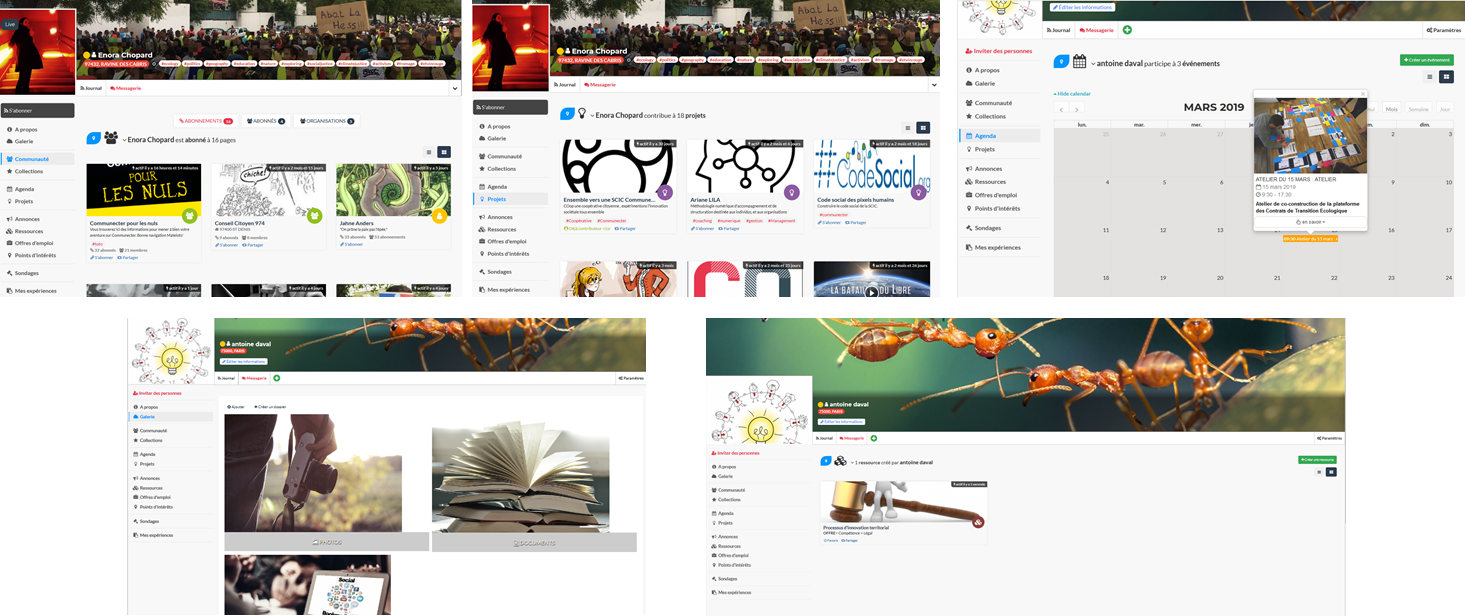
Les éléments dans Communecter§

Communecter est une base de données libre et géolocalisée des acteurs et des activités des territoires. Pour développer l’outil il a fallut définir plus précisement ce qu’on entendait par acteurs et activités.

Pour aller plus loin : Une base de données des acteurs et des activités de nos territoires : pourquoi et pour qui ?

Nous avons développé un "Modèle de territoire" dont les éléments regroupent une majorité (si ce n’est la totalité) des formes d’interactions sociales que nous trouvons dans nos territoires.

Dans ce modèle que nous avons souhaité simple et pragmatique, on distingue 2 types d’éléments :

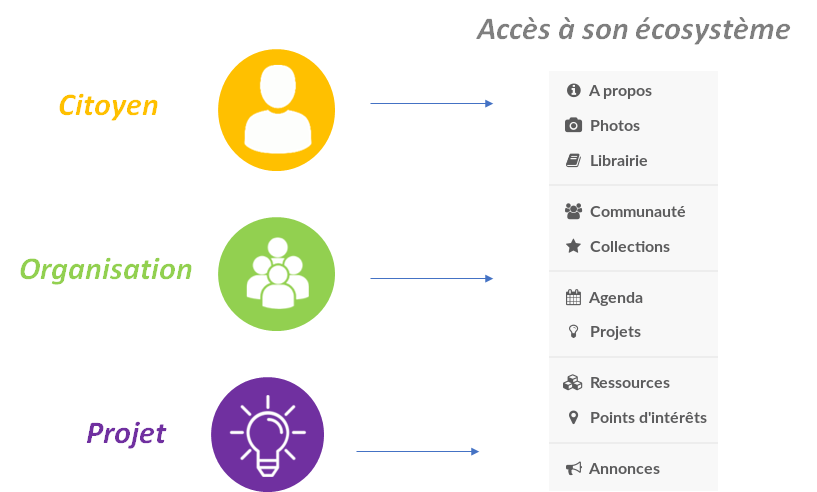
  • Les éléments principaux qui ont une existence autoporteuse dans COmmunecter (possèdent une URL propre) et sont associé à un écosystème propre. Il s’agit de citoyens, d’organisation, de projets ou d’événements.
  • Les petits éléments qui découlent nécessairement d’éléments principaux (points d’intérêt, ressources, annonces…)

Éléments principaux§

Chaque élément principal possède une URL propre permettant d’accéder à une fiche de présentation de son écosystème.

⥅ [[/Images/elements-ecosysteme.png]]

Citoyens§

Qu’est ce qu’un Citoyen pour COmmunecter ?§

L’individu est au centre de toute l’architecture et de tous les services de COmmunecter.

⥅ [[/Images/elements-individu.png]]

Le citoyen est ici défini comme une personne souhaitant contribuer à ou simplement prendre connaissance de la vie de son territoire. Son rôle, ses centres d’intérêts, ses capacités et ressources ne sont pas prédéfinies et sont totalement ouverts !

Citoyens et ouverture de compte COmmunecter : un simple visiteur peut rechercher et accéder à tout le contenu public référencé sur COmmunecter. Pour devenir "Citoyen" référencé sur le réseau COmmunecter et pour pouvoir contribuer, il faut ouvrir un compte. C’est nécessaire pour poster du contenu, donner son avis, déclarer un projet, s’inscrire à un événement, etc. Ca peut être en son nom ou sous un pseudo, selon les envies de chacun et la manière dont on a envie d’interagir.

L’écosystème du citoyen, ses attributs et les outils à sa disposition :§

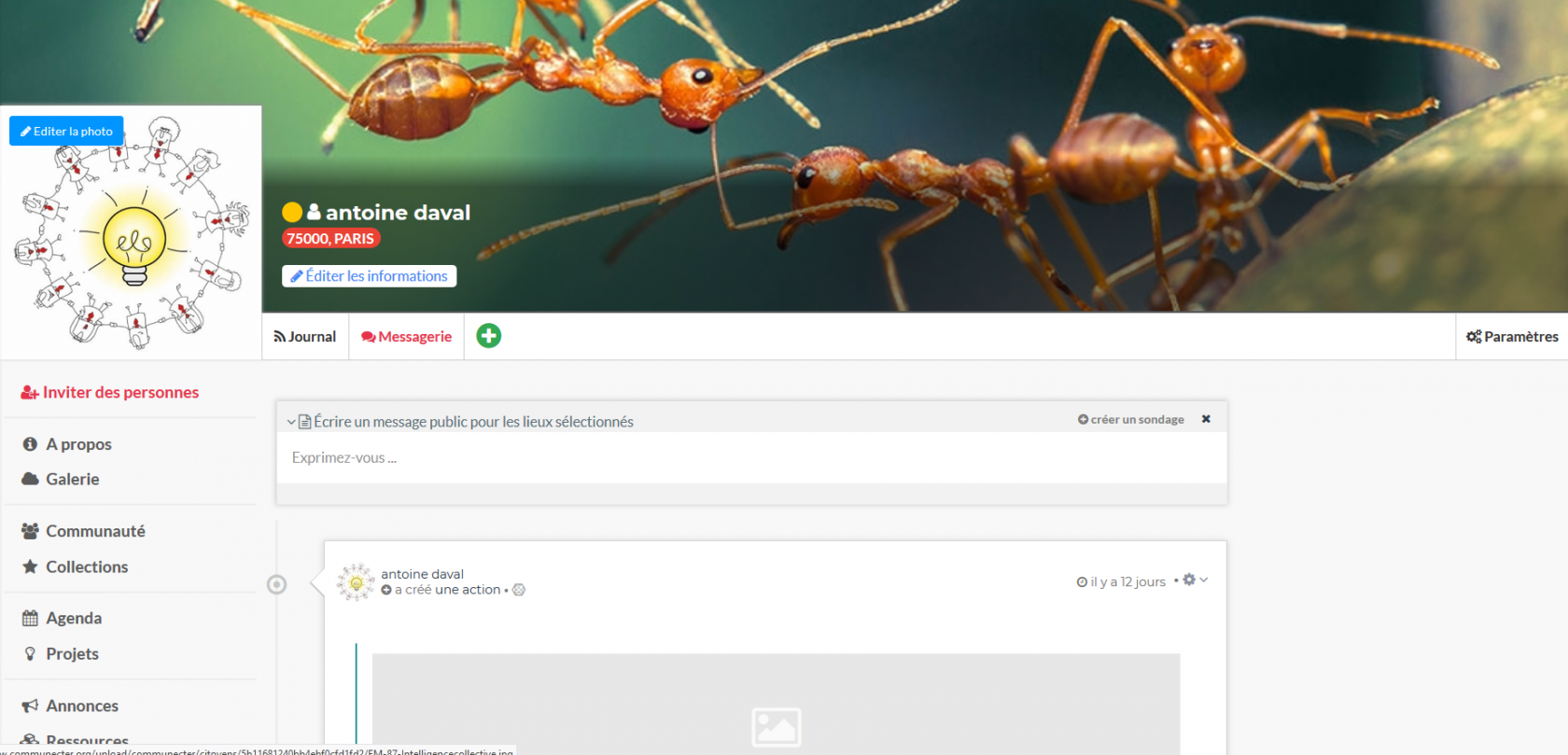
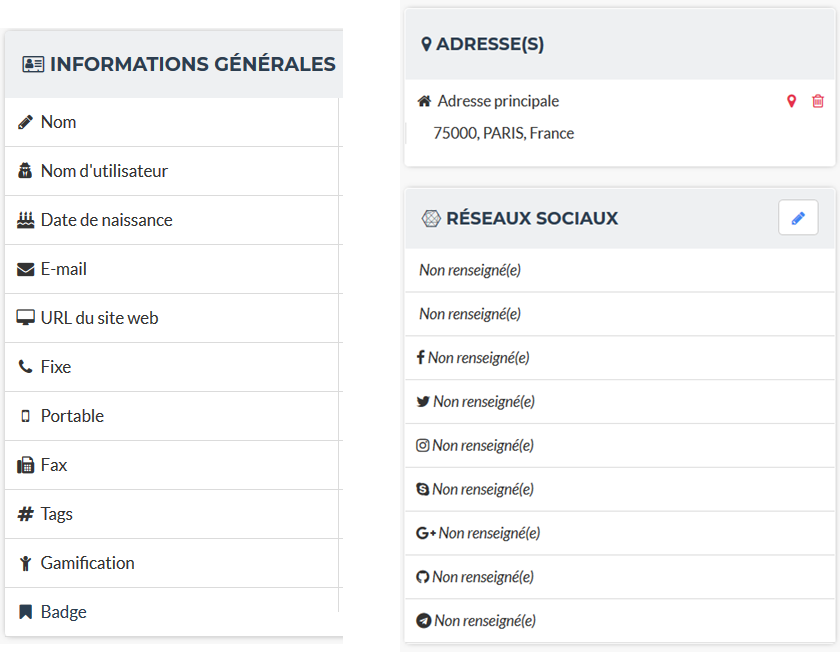
Pour exister, il suffit au citoyen d’avoir un nom d’utilisateur. il peut ensuite librement renseigner diverses autres informations utiles à s’identifier auprès de ses pairs et à ses activités sur COmmunecter (ces informations sont disponible dans À propos).

⥅ [[/Images/elements-individu-infos.png]]

Le citoyen peut accéder à différents outils : l’agenda affiche les évènements auxquels le citoyen participe. On a également accès aux Projets auxquels il contribue, ainsi qu’aux Ressources et Annonces qu’il a déclaré.

⥅ [[/Images/elements-individu-profils.png]]

Photos ouvre sa galerie publique, et Librairie permet d’accèder aux URL et documents partagées. L’onglet Communauté liste les éléments auquel il est abonné, les utilisateurs·trices qui souhaitent recevoir son actualité et les organisations dont il est membre.

Une liste de ses Points d’intérêts est accessible et n’importe qui peut créer des Collections d’éléments pour naviguer plus rapidement.

Organisations, projets et évènements§

Ces éléments peuvent afficher les mêmes informations qu’un citoyen (agenda, projets, communauté, etc..) et possède une rubrique Nous contacter. La section Nos valeurs est disponible pour les organisations et projets.

Organisation§

C’est un groupement d’individus obligatoirement typé dans une de ces catégories : Association, Groupe, Entreprise ou Service public.

⥅ [[/Images/elements-orga.png]]

Pour créer et gérer une organisation il faut d’abord se créer un compte en tant qu’individu.

Projet§

Les projets sont des actions délimités dans le temps.

⥅ [[/Images/elements-projet.png]]

Événement§

Les évènements apparaissent dans l’[agenda](/2 - Utiliser l’outil/Fonctionnalités/agenda.md). Un évènement (ex : un festival) peut créer des sous-évènements (ex : concerts, conférences, …) qui apparaitront dans l’onglet Programme.

⥅ [[/Images/elements-evenement.png]]

Petits éléments§

Les petits éléments sont obligatoirement déclarés par un élément principal. Ils possèdent une description succincte et il est possible d’y associer une photo. Ces éléments s’ouvrent dans un simple panneau latéral, contrairement aux éléments principaux qui possèdent une fiche complète.

Point d’intérêt§

Ils sont utilisés pour référencer des endroits où se trouvent du matériel ou des œuvres installées dans un lieu public. Exemples : compost, graffiti, scène de concert, toilettes, …

⥅ [[/Images/elements-poi.png]]

Ressource§

C’est une offre ou un besoin de service, compétence ou matériel.

⥅ [[/Images/elements-ressource.png]]

Annonce§

Une annonce est utile pour vendre, louer, donner du matériel, ou pour chercher un emploi.

⥅ [[/Images/elements-annonce.png]]

📜 File en/02 - Utiliser l'outil/Fonctionnalités/Concepts/elements.md by @communecter ☆ 📎

Les éléments dans Communecter§

Communecter est une base de données libre et géolocalisée des acteurs et des activités des territoires. Pour développer l’outil il a fallut définir plus précisement ce qu’on entendait par acteurs et activités.

Pour aller plus loin : Une base de données des acteurs et des activités de nos territoires : pourquoi et pour qui ?

Nous avons développé un "Modèle de territoire" dont les éléments regroupent une majorité (si ce n’est la totalité) des formes d’interactions sociales que nous trouvons dans nos territoires.

Dans ce modèle que nous avons souhaité simple et pragmatique, on distingue 2 types d’éléments :

  • Les éléments principaux qui ont une existence autoporteuse dans COmmunecter (possèdent une URL propre) et sont associé à un écosystème propre. Il s’agit de citoyens, d’organisation, de projets ou d’événements.
  • Les petits éléments qui découlent nécessairement d’éléments principaux (points d’intérêt, ressources, annonces…)

Éléments principaux§

Chaque élément principal possède une URL propre permettant d’accéder à une fiche de présentation de son écosystème.

⥅ [[/Images/elements-ecosysteme.png]]

Citoyens§

Qu’est ce qu’un Citoyen pour COmmunecter ?§

L’individu est au centre de toute l’architecture et de tous les services de COmmunecter.

⥅ [[/Images/elements-individu.png]]

Le citoyen est ici défini comme une personne souhaitant contribuer à ou simplement prendre connaissance de la vie de son territoire. Son rôle, ses centres d’intérêts, ses capacités et ressources ne sont pas prédéfinies et sont totalement ouverts !

Citoyens et ouverture de compte COmmunecter : un simple visiteur peut rechercher et accéder à tout le contenu public référencé sur COmmunecter. Pour devenir "Citoyen" référencé sur le réseau COmmunecter et pour pouvoir contribuer, il faut ouvrir un compte. C’est nécessaire pour poster du contenu, donner son avis, déclarer un projet, s’inscrire à un événement, etc. Ca peut être en son nom ou sous un pseudo, selon les envies de chacun et la manière dont on a envie d’interagir.

L’écosystème du citoyen, ses attributs et les outils à sa disposition :§

Pour exister, il suffit au citoyen d’avoir un nom d’utilisateur. il peut ensuite librement renseigner diverses autres informations utiles à s’identifier auprès de ses pairs et à ses activités sur COmmunecter (ces informations sont disponible dans À propos).

⥅ [[/Images/elements-individu-infos.png]]

Le citoyen peut accéder à différents outils : l’agenda affiche les évènements auxquels le citoyen participe. On a également accès aux Projets auxquels il contribue, ainsi qu’aux Ressources et Annonces qu’il a déclaré.

⥅ [[/Images/elements-individu-profils.png]]

Photos ouvre sa galerie publique, et Librairie permet d’accèder aux URL et documents partagées. L’onglet Communauté liste les éléments auquel il est abonné, les utilisateurs·trices qui souhaitent recevoir son actualité et les organisations dont il est membre.

Une liste de ses Points d’intérêts est accessible et n’importe qui peut créer des Collections d’éléments pour naviguer plus rapidement.

Organisations, projets et évènements§

Ces éléments peuvent afficher les mêmes informations qu’un citoyen (agenda, projets, communauté, etc..) et possède une rubrique Nous contacter. La section Nos valeurs est disponible pour les organisations et projets.

Organisation§

C’est un groupement d’individus obligatoirement typé dans une de ces catégories : Association, Groupe, Entreprise ou Service public.

⥅ [[/Images/elements-orga.png]]

Pour créer et gérer une organisation il faut d’abord se créer un compte en tant qu’individu.

Projet§

Les projets sont des actions délimités dans le temps.

⥅ [[/Images/elements-projet.png]]

Événement§

Les évènements apparaissent dans l’[agenda](/2 - Utiliser l’outil/Fonctionnalités/agenda.md). Un évènement (ex : un festival) peut créer des sous-évènements (ex : concerts, conférences, …) qui apparaitront dans l’onglet Programme.

⥅ [[/Images/elements-evenement.png]]

Petits éléments§

Les petits éléments sont obligatoirement déclarés par un élément principal. Ils possèdent une description succincte et il est possible d’y associer une photo. Ces éléments s’ouvrent dans un simple panneau latéral, contrairement aux éléments principaux qui possèdent une fiche complète.

Point d’intérêt§

Ils sont utilisés pour référencer des endroits où se trouvent du matériel ou des œuvres installées dans un lieu public. Exemples : compost, graffiti, scène de concert, toilettes, …

⥅ [[/Images/elements-poi.png]]

Ressource§

C’est une offre ou un besoin de service, compétence ou matériel.

⥅ [[/Images/elements-ressource.png]]

Annonce§

Une annonce est utile pour vendre, louer, donner du matériel, ou pour chercher un emploi.

⥅ [[/Images/elements-annonce.png]]

📚 Agora node [[english cpr infants]] (pulled by the Agora)
📜 File Emergency/english_CPR_infants.md by @KGBicheno ☆ 📎

# CPR for infants (under 1 year)

The upper airway in infants is easily obstructed because the trachea (windpipe) is soft and may be distorted by an excessive backward head tilt or chin lift. In infants, therefore, the head should be kept neutral and maximum head tilt should not be used. The lower jaw should be supported at the point of the chin with the mouth maintained open. There must be no pressure on the soft tissues of the neck. If this does not provide a clear airway, the head may be tilted backwards very slightly with a gentle movement. What to do 1 Place the infant on their back on a firm surface. 2 Locate the lower half of the sternum (breastbone) in the centre of the chest. 3 Place 2 fingers over the lower half of the sternum. 4 Press down on the infant’s chest by about one-third depth. 5 Release the pressure. Pressing down and releasing is 1 compression. 6 Give 30 compressions. Giving 2 breaths 1 Tilt the infant’s head back very slightly. 2 Lift the infant’s chin to bring their tongue away from the back of their throat. Avoid pressure on the neck and the soft tissue under the chin. 3 Give breaths by placing your lips over the infant’s mouth and nose, and blow steadily for about 1 second, watching for the chest to rise 4 Turn your mouth away from the infant’s mouth and watch for chest to fall, and listen and feel for signs of air being expelled. Maintain head tilt and chin lift. 5 Take another breath and repeat the sequence above. This is now 2 breaths. 6 If the chest does not rise, recheck the mouth and remove any obstructions, and ensure there is a good seal around the mouth and nose.

📚 Agora node [[equity accounts]] (pulled by the Agora)
📜 File Equity accounts.md by @dr_kvj ☆ 📎
  • [[Equity]] funds have different sources and hence equity is stored in different types of [[Accounts]]

Types of Equity Accounts§

The following equity accounts are commonly used by corporations:

Common stock. This is the par value of the stock sold directly to investors. Par value tends to be quite small or nonexistent, so the balance in this account may be minimal.

Preferred stock. This is the par value of preferred stock. These shares have special rights and privileges beyond those accorded to common stock. Some organizations have never issued preferred stock, while others may have issued a number of tranches of it.

Additional paid-in capital. This is the amount paid by investors in excess of par value on stock sold directly to them by the issuer. The balance in this account can be quite substantial, especially in view of the minimal par value amounts assigned to most stock certificates.

Retained earnings. This is the amount of earnings generated by a business to date, less the amount of any distributions back to shareholders in the form of dividends.

Treasury stock. This is a contra account that contains the amount paid to investors to buy back shares from them. This account has a negative balance, and so reduces the total amount of equity.

📚 Agora node [[escaped and raw components]] (pulled by the Agora)
📜 File not/Projects/Astro/RFCs/escaped-and-raw-components.md by @evan ☆ 📎 🤗
  • Start Date: 2022-01-23
  • Implementation PR: (leave this empty)
  • Evans sanity spiral 2/4

Summary§

This RFC adds two new components to astro, Raw, and Escaped. Both are frontends for existing or to be implemented features

Example§

<Raw><>>>><<<SdsdasSd <$%> {let i = 5;}</Raw>

gets compiled to

<>>>><<<SdsdasSd <$%> {let i = 5;}

<Escaped><h1>Yo!</h1></Escaped>

gets compiled to

&lt;h1&gt;Yo!&lt;/h1&gt;

Motivation§

This makes two astro features more easily accessible.

Detailed design§

Raw§

  • Frontend component for astro-data-raw
  • Blocked by compiler/#263

Escaped§

Drawbacks§

  • Adds uneeded complexity
  • Not really needed

Alternatives§

Just don’t do it.

Unresolved questions§

Is Escaped possible using frontmatter?


Incredibly high quality RFC I know.

📚 Agora node [[events]] (pulled by the Agora)
📜 File 04 - Documentation technique/events.md by @communecter ☆ 📎

events§

l’agenda§

la récurence§

un programme : lien de parenté entre events§

affichage des events enfant§

aggrégateur pour centraliser : lien de parenté entre events et leur parent§

affichage des events enfant§

📜 File en/04 - Documentation technique/events.md by @communecter ☆ 📎

events§

l’agenda§

la récurence§

un programme : lien de parenté entre events§

affichage des events enfant§

aggrégateur pour centraliser : lien de parenté entre events et leur parent§

affichage des events enfant§

📜 File events.md by @flancian ☆ 📎 ️🔗 ✍️
📚 Agora node [[experiments]] (pulled by the Agora)
📜 File experiments.md by @flancian ☆ 📎 ️🔗 ✍️
📚 Agora node [[filaments]] (pulled by the Agora)
📜 File filaments.md by @agora@botsin.space ☆ 📎
📚 Agora node [[fonts]] (pulled by the Agora)
📜 File fonts.md by @flancian ☆ 📎 ️🔗 ✍️

Fonts§

📜 File pages/fonts.org by @jakeisnt ☆ 📎

Notes on fonts and font design.

Cool Fonts

Prose

  • GT Flexa

  • Ferrite Core

  • Didot: :: 'Timeless elegance'; old and sophisticated.

  • Warnock :: Powerful with a lot of glyphs. It's an Adobe font and is probably expensive.

  • Trajan :: based on roman typography!

  • Bembo :: Revival of monotype. Graceful, stable and elegant! More subtle than a Didot.

  • DejaVu Fonts:: used for configuration a bit

  • Futura :: A classic futuristic font. Can be seen in places like Ableton's website

  • Garamond :: Both a legal font and an exceptionally legible one.

  • Caslon :: Organic, beautiful style — check this one out!

  • Freight Sans :: fun and cartoonish font feel.

  • Open Sans :: The new sans font with a neutral, flat design.

  • Gill Snas :: warm british, a bit tall, crisp lines

  • Gotham :: New York signage lettering style.

  • Akzidenz Grotesk Font Free - Download Fonts

https://www.indesignskills.com/inspiration/best-fonts-graphic-designers/

To Investigate

Monospace

  • source code pro

  • jet brains mono

  • iosveka

  • ibm plex

  • fira code

  • pragmata pro

  • dank mono

  • victor mono

  • menlo

  • consolas

  • roboto mono

  • adore64

  • hermit light

  • opendyslexic mono

  • cascadia code pl

  • source code pro with emacs hasklig mode

https://sourcefoundry.org/hack/ — designed for source code! https://github.com/huytd/haskplex-font put this on the AUR!

Vocabulary

Design

  • Motion Design :: Text in motion carefully chose to make text readable in videos and other animations. This text isn't visible all the time; rather, it's moving quickly and likely flashes past during a video.

  • Variable Fonts :: One or more axes that provide variation between different extremes of typeface design. These fonts allow for finer control over the design as it changes across the design space! A font can often be installed as regular, bold or both, and extended designs are expressed nicely. Formally, this is a specification that allows for multiple fonts to be packaged in a single file.

  • typeface :: A particular design of type. A single group of fonts; a set of fonts in the same style, or 'font family'.

  • font :: An instance of a typeface; a single weight of style within a typeface family.

Type

  • baseline :: The line on which type sits.

  • height :: THe distance from baseline to the top of the lowercase letters, disregarding tall letters such as h.

  • cap height :: The distance between a capital letter and baseline.

  • ascenders :: The stem above lowercase letters that extends above the alloted height.

  • descenders :: Letters that extend below the baseline.

  • stem :: The main stroke of the letter (usually vertical).

  • tail :: Descending, decorative stroke on letters such as y and q.

  • serif :: The flair extending off of the edge of letters. Defines a 'font family' (serif vs sans serif).

  • counter :: The enclosed space within letters like o and g.

  • ear :: The small extension on lower half of the letter g.

  • terminal :: The end of a stroke without a serif.

  • aperture :: Partially closed negative space in characters like c, s, and n. This is always rounded.

  • bowl :: The curved part of the character enclosing the circular or curved parts of letters. This occurs in letters like o, d and b.

  • kerning :: Adjusting the space between individual characters.

  • tracking :: The spacing of a group of characters.

  • alignment :: text should probably be left aligned

  • justifying text :: adding a straight edge to text on boht sides

  • measure :: length of lines of text in a paragraph of column (column width)

  • Leading :: Vertical line spacing. generating sufficient space between lines to make it readable

  • Ligatures :: Fusing characters that are next to one another that look very similar. These characters may look awkward when next to one another if they aren't fused.

  • Hyphenation :: Breaking a word across a line and separating it with a dash; a technique typically used to prevent rag problems.

  • hyphen :: short dash '-'. used to divide words that break at the end of the line or to connect parts of co mpound words such as 'ill-fated'. these are used to represent relationships between individuals rather th an separating them.En-dash : slightly longer hthan the hyphe. used to indicate a range of values, such as a span of time or numerical quantities. sometimes the em-dash is used instead of the en-dash for aesthetic reasons, or a sm all amount of space is added befoer or after the dash for artistic purposes.Em-dash : longer than that!the em-dash is typically used to indicate a break in thought, and is normally followed with and preceded by space. It can be used to describe a thought within a sentence as well — case in point!grid : guide by which graphic designers can organize, copy and add images in a flexible way while making the concepts easy to absorb and understand.

  • Rag :: The uneven vertical edge of a block of type — most commonly the right-hand edge. if the rag is not clean, it can be very distracting to the eye; this can be fixed by reworking the line breaks or by editing a copy.

  • Widow :: A single word or short line left at the end of a column. This is considered bad typography.

  • Orphan :: A line exists at the top of the following column! This can be fixed just like the rag, by reworking the line breaks or editing the copy to remove these typography misdeeds.

History

  • printing press :: Used a font based on blackletter, similar ot the font traditionally used with handwritten material. This wasn't good for printing. Roman type was created to solve this problem. First, Jenson, but the most recognizable roman font is Cambria.

Italics

created to save space and money when printing books and long form texts.paved road for old style, transitional style and modern styles of typing.

Caslon

created 'old style' or 'Antiqua' of type : old style typefaces have thick serifs, low contrast. these are typically created from 1470 to 1600.

Transitional typefaces

thin serifs with high contrasts between these types. Baskerville is one such font (which was created as an improvement to the caslon typeface!

Modern style

very thin serifs with extreme contrast between strokes. created to reject traditional styles, annoyed with typefaces based on handwriting! Modern style initiated by Firmin Didot and Giambatista Bodoni ; Firmin Didot created modern style classification type, Didot, followed by the Bodoni typefaces

William Caslon IV

sans serif typefaces — no projecting featues at the end of strokes! Helvetica : known as the favorite typeface, one of the most populat. variations on this include slab serifs and gemoetric sans. slab : magazines, newspaper headers; geometric : based on simple geometric shapes.

Susan Kare - great apple designer! She did Chicago, a neat pixel sans-serif

typeface — this could be cool to use, as well as Monaco - (kind of boring) . geneva is the third typeface; it's inspired by helvetica and is a neo-grotesque typeface, a realist typeface including basic ligatures, long s and r rotunda as o ptionals. bitmap fonts are very cool and I should look into using them! realist ~=grotesquemore reading (TODO):: https://en.wikipedia.org/wiki/Sans-serif#GrotesqueCreative

Embellishments

indents: indenting the first line of every paragraph has always been a convention — to create a visual separation between paragraphsCreative ieaas : extreme indent, outdent. with room and for a cleaner, more open look, separate paragraph s with an extra line rather than using tab indentation at all!arabesques :; graphic ordaments and embellishments — from simple geometric designs to ornate configurations. many are often digital recreations of historic designs. they have many uses - have fun with them

Classifying Type

Serif

Traditional typefaces with feet or arms hanging off of the end of letter strokes, adding a thick or thin look to the letter. These are considered the easiest fonts to read. Serif fonts are 'fancy' fonts — they all have embellishments. Times New Roman, a serif font, is the most used font as the most common font found in newspapers.

  • Examples :: baskerville, clarendon, garamond, georgia, trajan

Sans-Serif

Fonts without serifs and having an overall more even stroke weight. clean, modern, minima list

  • Examples :: arial, futura, impact, myriad, tahoma

Decorative

Fonts typically used only for attention-grabbing headlines. Only one decorative font should be used, and not as the body font!

Script

Script fonts are intended to mimic handwriting, so the letters often touch one another. These fonts should never be used with all-caps.

Dingbats

These fonts contain characters that are small pieces of art, used to enhance the design of the page. Dingbats are usually packaged with a specific font and mimic its style.

Best Practices

Font Size

On computers, 72 pt. font corresponds to one inch on paper. Two different font sizes at the same point can correspond to different physical sizes, and correct size does depend on use.

Spacing

  • character and word spacing, kerning, — space between each character or letter, adjusted to create plea sing look

tracking, — adjustment of word spacing, similar to kerning but refers to space between words rather than characters line spacing, leading — amount of space between lines of type — larger the type, the more leading neede d! , paragraph spacing, alignment, — alignment : text flowing on a page. center, left, right etc. justifie d : straight edge on boht sides! line breaks and rag, hyphens, — don't have more than two hyphenations in a row, don't have too many hyphenated lines in a si ngle paragraph, ensure the rag checks out, make sure that justified text looks natural widows and orphans — paragraph spacing — at end: widow; at top of following; orphan! do not leave these distracting shapes! edit the copy to remove them.

never use bold serif type, apparently? john cane is very against it.

type blogs / references

http://www.atypeprimer.com/ — written by northeastern prof, all about type! http://www.atypeprimer.com/exercises/understanding-letterforms/ http://www.thomasphinney.com/ http://typeforyou.blogspot.com/ https://www.adobe.com/products/type.html https://www.bertholdtypes.com/ https://fontbureau.typenetwork.com https://fontshop.com https://www.typography.com/ https://www.linotype.com/ — cool fonts to browse https://www.monotype.com/ — 'world's largest type library" https://www.monotype.com/ — duo of complimentary typeface families https://www.amazon.co.uk/Type-Primer-John-Kane/dp/1856696448/ref=sr_1_2?s=books&ie=UTF8&qid=1295387779&sr =1-2 — buy the book or something! https://www.amazon.com/Type-Primer-John-Kane-dp-1856696448/dp/1856696448/ref=mt_paperback?_encoding=UTF8& me=&qid=1587603890 — some other link to it . https://fontsinuse.com/ — showcases examples of fonts and their uses!

misc

https://vistaserv.net/blog/90s-fonts-modern-browsers — a quest to design a font that looks retro in the modern browser https://camd.northeastern.edu/art-design/research-approach-art-design/ cool art profs at northeastern https://camd.northeastern.edu/faculty/gloria-sutton/ https://camd.northeastern.edu/faculty/sarah-kanouse/

https://www.lyssn.io/ — this person works at neu https://studycrafter.com/ this person is also at neu https://camd.northeastern.edu/faculty/casper-harteveld/ — using games to improve technology! http://mutazionegame.com/ — this is by someone at neu, apparently, seems cool https://www.prototypo.io/blog/news/how-make-a-monospaced-font-in-prototypo/ — font tutorial https://design.tutsplus.com/tutorials/how-to-create-a-font-using-fontself-and-fontforge—cms-25923 — using fontforge to make a font https://www.reddit.com/r/Design/comments/8bt8d4/today_i_decided_to_learn_how_to_make_fonts_after/

https://blog.golang.org/go-fonts — fonts at Go! https://airbnb.design/introducing-airbnb-cereal/ — airbnb neat font

https://fontsinuse.com/uses/2291/ableton-website — ableton fonts! reading on type defining a brand https://glyphsapp.com/ good tool

http://typography.philipyoungg.com/

Mass-Driver™

be5invis/Iosevka: Slender typeface for code, from code. Ultimate Oldschool PC Font Pack v2.0 Released sparks a typeface for creating spark lines in text without any code Glorifying Eclectic Typography | TypeRoom Blaze Type | Type catalogue

https://fonts.google.com/specimen/Rubik https://fonts.google.com/specimen/Roboto+Mono https://github.com/deuveir/design.typography

https://practicaltypography.com/font-recommendations.html font advice from amtthew butterick

📜 File fonts.md by @agora@botsin.space ☆ 📎
📚 Agora node [[four quadrants]] (pulled by the Agora)
📜 File four quadrants.md by @flancian ☆ 📎 ️🔗 ✍️

Four Quadrants§

📚 Agora node [[fragments]] (pulled by the Agora)
📜 File fragments.md by @flancian ☆ 📎 ️🔗 ✍️
📚 Agora node [[free instruments]] (pulled by the Agora)
📜 File free instruments.md by @flancian ☆ 📎 ️🔗 ✍️
📚 Agora node [[free soundfonts]] (pulled by the Agora)
📜 File free soundfonts.md by @flancian ☆ 📎 ️🔗 ✍️
📚 Agora node [[féderation des events]] (pulled by the Agora)
📜 File 18 - Activitypub/Féderation des events.md by @communecter ☆ 📎

Fédération des événements§

Cette documentation présente la fonctionnalité de fédération des événements ActivityPub que nous avons mise en place sur notre plateforme.

Objectif


L’objectif final de cette documentation est de permettre aux utilisateurs de comprendre le fonctionnement de notre système de fédération des événements ActivityPub, et de faciliter l’interopérabilité entre notre plateforme et d’autres instances ActivityPub. En documentant notre système, nous espérons contribuer à l’expansion de l’écosystème ActivityPub et à la diffusion des événements à travers les réseaux sociaux décentralisés.

Table des matières§

Configuration de la fédération§

Cette section explique comment configurer votre compte utilisateur pour la fédération des événements ActivityPub.

Recherche et suivi d’utilisateurs du Fediverse§

Notre plateforme permet aux utilisateurs de rechercher et de suivre les utilisateurs du Fediverse. Les utilisateurs peuvent chercher des utilisateurs du Fediverse en utilisant leur adresse (@nom@adresse) sur le Fediverse. Lorsqu’un utilisateur suit un autre utilisateur du Fediverse, tous les événements publics publiés par cet utilisateur sur leur propre instance ActivityPub apparaîtront sur le fil des evenements de l’utilisateur de notre plateforme. La signature de ces événements sera celle de l’instance ActivityPub de l’utilisateur suivi, avec le logo et le nom de cette instance.

Pour suivre un utilisateur sur le Fediverse, un utilisateur peut :

  1. Trouver l’adresse de l’utilisateur sur le Fediverse en accédant à son profil sur leur instance ActivityPub.
  2. Copier l’adresse de l’utilisateur sur le Fediverse.
  3. Aller sur la page de votre profil dans notre plateforme.
  4. Puis dans la section "Reseau Extrene > Abonnement"
  5. Coller l’adresse de l’utilisateur sur le Fediverse dans la barre de recherche.
  6. Lancer la recherche ne tapant sur "Entrée" de votre clavier.
  7. Cliquer sur l’icone de suivre à côté du profil de l’utilisateur recherché.

Une fois que l’utilisateur est suivi, tous les événements publics qu’il publie sur son instance ActivityPub apparaîtront sur le fil des événements de l’utilisateur de notre plateforme.

Cette fonctionnalité offre aux utilisateurs de notre plateforme un accès à des événements publics publiés sur des instances ActivityPub externes, ce qui peut élargir leur portée et leur audience.

Gestion des invitations à rejoindre des groupes sur le Fediverse§

Lorsqu’un utilisateur est invité à rejoindre un groupe sur le Fediverse, les invitations seront affichée dans la section Réseau externe > Abonnées dans le profil de l’utilisateur sur notre plateforme.

L’utilisateur peut :

  1. Accéder à l’invitation dans la section Réseau externe > Abonnées de son profil.
  2. Accepter ou refuser l’invitation en cliquant sur l’icone correspondant.
  3. Une fois que l’utilisateur a rejoint le groupe sur l’instance, il pourra publier des événements publics sur cette instance.
  4. Ces événements publics seront alors automatiquement fédérés sur le Fediverse et apparaîtront à la fois sur le fil des événements de l’utilisateur de notre plateforme et sur le groupe pour lequel l’utilisateur a été invité à devenir membre.

Notez que la publication d’événements sur une instance de groupe sur le Fediverse est soumise aux politiques de modération de cette instance.

Fonctionnement de la fédération§

Cette section décrit comment fonctionne la fédération des événements ActivityPub sur notre plateforme.

La fédération des événements ActivityPub implique un échange de messages entre différentes instances ActivityPub. Les messages échangés sont basés sur le protocole ActivityPub et permettent à chaque instance de communiquer avec les autres instances.

Lorsqu’un utilisateur publie un événement sur son instance ActivityPub, cette instance envoie un message ActivityPub à toutes les instances fédérées pour informer les autres instances de la publication de l’événement. Les autres instances peuvent alors décider de récupérer l’événement et de l’afficher sur leur propre instance pour les utilisateurs qui les suivent.

De même, lorsqu’un utilisateur suit un autre utilisateur sur une instance fédérée, cette instance envoie un message ActivityPub à l’instance de l’utilisateur suivi pour l’informer de ce suivi. Cette instance peut alors décider d’envoyer un message ActivityPub à l’instance de l’utilisateur suiveur pour informer cette instance des événements publics publiés par l’utilisateur suivi.

Enfin, lorsqu’un utilisateur accepte une invitation à rejoindre un groupe fédéré sur une autre instance ActivityPub, l’instance de l’utilisateur envoie un message ActivityPub à l’instance du groupe pour informer cette instance de l’adhésion de l’utilisateur. Cette instance peut alors décider d’envoyer un message ActivityPub à l’instance de l’utilisateur pour l’inviter à publier des événements sur le groupe.

La fédération des événements ActivityPub est basée sur un échange de messages entre les différentes instances fédérées. Chaque message ActivityPub est envoyé de manière asynchrone et peut être récupéré et affiché sur les différentes instances des utilisateurs qui suivent les événements publiés.

Types de messages échangés entre les instances§

Les instances d’ActivityPub communiquent entre elles en échangeant différents types de messages. Voici les principaux types de messages échangés :

  • Objets : Ce sont les messages qui contiennent l’information, tels que les événements, les notes, les profils d’utilisateur, les groupes, etc. Les objets sont créés sur une instance, puis envoyés à d’autres instances pour être affichés sur leur plateforme.
  • Activités : Les activités sont des actions qui peuvent être effectuées sur les objets, telles que la publication d’un nouvel événement, la mise à jour d’un profil utilisateur, ou la participation à un groupe. Les activités sont envoyées à l’instance concernée pour que l’action soit effectuée.
  • Suivis : Les suivis sont des messages envoyés par une instance pour informer une autre instance qu’un utilisateur a commencé à suivre un autre utilisateur ou un objet sur leur plateforme.
  • Notifications : Les notifications sont des messages envoyés à un utilisateur pour le informer qu’une activité a eu lieu sur leur plateforme. Par exemple, lorsqu’un utilisateur est mentionné dans un événement ou lorsqu’un utilisateur rejoint un groupe.

Pour plus d’informations sur les différents types de messages échangés entre les instances, vous pouvez consulter la documentation officielle du protocole ActivityPub et ActivityStreams :

ActivityPub : https://www.w3.org/TR/activitypub/ ActivityStreams : https://www.w3.org/TR/activitystreams-core/

Règles de validation et de sécurité§

Les règles de validation et de sécurité sont importantes pour assurer l’interopérabilité des instances ActivityPub et garantir la sécurité des utilisateurs.

Le protocole ActivityPub utilise des règles de validation pour vérifier que les messages échangés entre les instances sont conformes aux normes établies. Les instances qui ne respectent pas ces normes peuvent être bloquées ou signalées par d’autres instances, ce qui peut entraîner une perte de visibilité sur le réseau.

Pour garantir la sécurité des utilisateurs, ActivityPub prend en compte plusieurs mesures de sécurité. Les messages sont signés numériquement pour s’assurer que les informations échangées sont authentiques et n’ont pas été modifiées en cours de route. De plus, les utilisateurs peuvent bloquer ou signaler des instances ou des utilisateurs individuels qui ne respectent pas les normes de conduite appropriées.

Il est important que les administrateurs d’instances ActivityPub prennent en compte ces règles de validation et de sécurité pour assurer le bon fonctionnement de leur instance et la sécurité de leurs utilisateurs. Pour plus d’informations, consultez la documentation officielle du protocole ActivityPub et ActivityStreams.

Limites de la fédération§

La fédération est un processus en constante évolution et peut présenter certaines limites et défis. Voici quelques-unes des limites de la fédération :

  • Les événements récurrents ne sont pas pris en charge par la fédération.
  • La mise à jour en temps réel des événements fédérés peut prendre un certain temps en raison des différences de mise en cache des instances.
  • Les invitations à des événements peuvent ne pas être correctement fédérées en raison de différences dans la façon dont les instances gèrent les données d’invitation.
  • Les images et les fichiers joints peuvent ne pas être correctement fédérés en raison de restrictions de taille ou de type de fichier.
  • Certaines fonctionnalités spécifiques à une instance, telles que les extensions personnalisées ou les fonctionnalités expérimentales, peuvent ne pas être disponibles sur d’autres instances fédérées.

Tests de fédération§

Cette section décrit les tests que nous avons réalisés pour évaluer l’interopérabilité de notre plateforme avec d’autres instances ActivityPub du Fediverse.

Mobilizon§

Nous avons testé l’interopérabilité de Mobilizon avec différentes fonctionnalités sur ces différentes versions. De plus, nous avons également effectué des tests sur différentes plateformes telles que Mobilizon.fr, Mobilizon.quebec, Mobilizon.asso.fr et d’autres instances auto-hébergées. Voici un tableau récapitulatif des tests que nous avons effectués :

Fonctionnalités / Versions 1.1.3 1.2.3-dirty 2.0.0 2.0.2 2.1.0 3.0.0 3.0.1 3.0.2 3.0.3 3.0.4 (mobilizon.fr)
Suivre un utilisateur ou groupe Mobilizon ✔️ ✔️ ✔️ ✔️ ✔️ ✔️ ✔️ ✔️ ✔️ ✔️
Interception de la création d’un événement ✔️ ✔️ ✔️ ✔️ ✔️ ✔️ ✔️ ✔️ ✔️ ✔️
Interception de la modification d’un événement ✔️ ✔️ ✔️ ✔️ ✔️ ✔️ ✔️ ✔️ ✔️ ✔️
Interception de la suppression d’un événement ✔️ ✔️ ✔️ ✔️ ✔️ ✔️ ✔️ ✔️ ✔️ ✔️
Interception de la participation à un événement ✔️ ✔️ ✔️ ✔️ ✔️ ✔️ ✔️ ✔️ ✔️ ✔️
Accepter l’invitation par un groupe Mobilizon ✔️ ✔️ ✔️ ✔️ ✔️ ✔️ ✔️ ✔️ ✔️ ❌
Refuser l’invitation par un groupe Mobilizon ✔️ ✔️ ✔️ ✔️ ✔️ ✔️ ✔️ ✔️ ✔️ ❌
Fédérer la création d’un événement sur Mobilizon ✔️ ✔️ ✔️ ✔️ ✔️ ✔️ ✔️ ✔️ ✔️ ❌
Fédérer la mise à jour d’un événement sur Mobilizon ✔️ ✔️ ✔️ ✔️ ✔️ ✔️ ✔️ ✔️ ✔️ ❌
Fédérer la suppression d’un événement sur Mobilizon ✔️ ✔️ ✔️ ✔️ ✔️ ✔️ ✔️ ✔️ ✔️ ❌
📚 Agora node [[google fonts]] (pulled by the Agora)
📜 File google-fonts.md by @neil ☆ 📎 ️🔗 ✍️

Google Fonts§

📜 File Google Fonts.md by @an_agora@twitter.com ☆ 📎
📚 Agora node [[gradients]] (pulled by the Agora)
📜 File gradients.md by @an_agora@twitter.com ☆ 📎
📚 Agora node [[hitclubapartments]] (pulled by the Agora)
📜 File hitclubapartments.md by @patterning ☆ 📎
📜 File stoa-test/hitclubapartments.md by @agora ☆ 📎

⥅ [[https://md.kif.rocks/uploads/adcbc6c6-b028-41b0-b1f9-71b9385d1ffe.jpeg]]

hitclub.apartments§

Hitclub là cổng game cá cược thuộc thập đoàn Gambling Supervision Commission. Chúng tôi là trang web cá cược đại lý chính thức tại khu vực châu Á chuyên cung cấp các trò chơi game bài, tài xỉu, xổ số trực tuyến cho hội viên. Website: https://hitclub.apartments/ Địa chỉ: 724 Đ. Trường Sa, Phường 14, Quận 3, Hồ Chí Minh, Vietnam Sđt: +84986126532 Hastag: #hitclub, #cong_game_hitclub, #game_bai_hitclub, #tai_xiu_hitclub https://www.facebook.com/hitclubapartments/ https://www.youtube.com/@hitclubapartments https://www.pinterest.com/hitclubapartments/ https://vimeo.com/hitclubapartments https://aboutme.style/hitclubapartments https://quangcaoso.vn/hitclubapartments https://www.ameba.jp/profile/general/hitclubapartments/ https://www.blogger.com/profile/07058815530295247289 https://gravatar.com/hitclubapartments https://www.tumblr.com/hitclubapartments https://prosinrefgi.wixsite.com/pmbpf/profile/hitclubapartments/profile https://www.openstreetmap.org/user/hitclubapartments https://www.twitch.tv/hitclubapartments/about https://issuu.com/hitclubapartments https://hitclubapartments.bandcamp.com/album/hitclubapartments https://onlyfans.com/hitclubapartments https://about.me/hitclubapartments/

📜 File hitclubapartments.md by @anonymous@doc.anagora.org ☆ 📎 ✍️
📚 Agora node [[indigenousmovements]] (pulled by the Agora)
📜 File IndigenousMovements.md by @agora@botsin.space ☆ 📎
📚 Agora node [[intelligent agents]] (pulled by the Agora)
📜 File Intelligent Agents.md by @agora@botsin.space ☆ 📎
📜 File Intelligent Agents.md by @flancian@social.coop ☆ 📎
📚 Agora node [[intents]] (pulled by the Agora)
📜 File intents.md by @flancian ☆ 📎 ️🔗 ✍️

Intents§

📜 File Artificial Intelligence/Creating Chatbots/Week 1/Intents.md by @KGBicheno ☆ 📎

Intents§

Go to [[How to build a Chatbot with Watson Assistant]] or [[Building AI-powered Chatbots with Watson]]

Chatbot series:

Intents try to capture what the user wants (their goal) in the conversation.

Intents vs Examples§

  • greeting_us_en <— Intent
    • Hello
    • Hi <— Examples
    • Wassup
  • location_qustion_au
    • Where are your Brisbane offices?
    • Where can I find you?
    • What’s your website?

Create intents in the skill section of the Watson Assistant section.

⥅ [[Creating_Intents.pdf]]

Give at least 5 examples per intent to train Watson, though the more the merrier.

A map of where intents exist in the dialog flow

Importing/Exporting Intents and examples§

Intents and examples can be imported and exported via csv file in the intents page of the skill.

The format is a simple two-column comma-delemeted format with examples followed by intents, one per row, as below.

What time are you open until?,hours_info
What are your hours of operation?,hours_info
What are your hours?,hours_info
Are you open on Sundays?,hours_info
what are you hours of operation in Toronto,hours_info
what are the hours of operation for your Montreal store,hours_info
list of your locations,location_info
Where are your stores?,location_info
📚 Agora node [[javascript comments]] (pulled by the Agora)
📜 File Programming/Javascript/JavaScript - Comments.md by @KGBicheno ☆ 📎

Comments in JavaScript§

Single line comments are handled with // while mult-line comments are handled with matching /* and */ pairs on separate lines:

/*
This is a mult-line comment.
****************************************************************
Everything in here is a comment.
*/

var FirstName = "John";
console.log(FirstName)

//This is a single line comment, nothing in this line will be executed

var LastName = "Smith";
var Age = 28;
console.log(LastName)
console.log(Age)

var FullAge = true;
console.log(FullAge);

var job;
console.log(job);

job = "Teacher";
console.log(job)


📚 Agora node [[kenyas informal settlements]] (pulled by the Agora)
📜 File kenyas-informal-settlements.md by @neil ☆ 📎 ️🔗 ✍️

Kenya’s informal settlements§

https://theconversation.com/the-fascinating-history-of-how-residents-named-their-informal-settlements-in-nairobi-159080

📚 Agora node [[keypoints]] (pulled by the Agora)
📜 File Artificial Intelligence/Introduction to AI/Week 3 - Introduction/Definitions/Keypoints.md by @KGBicheno ☆ 📎

keypoints§

Go back to the [[AI Glossary]]

#image

The coordinates of particular features in an image. For example, for an image recognition model that distinguishes flower species, keypoints might be the center of each petal, the stem, the stamen, and so on.

📚 Agora node [[knowledge elements]] (pulled by the Agora)
📜 File Knowledge Elements.md by @an_agora@twitter.com ☆ 📎
📚 Agora node [[layout components]] (pulled by the Agora)
📜 File docs/layout-components.md by @matthieuG ☆ 📎

Quartz provides several higher-order components that help with layout composition and responsive design. These components wrap other components to add additional functionality or modify their behavior.

Flex Component§

The Flex component creates a flexible box layout that can arrange child components in various ways. It’s particularly useful for creating responsive layouts and organizing components in rows or columns.

type FlexConfig = {
  components: {
    Component: QuartzComponent
    grow?: boolean // whether component should grow to fill space
    shrink?: boolean // whether component should shrink if needed
    basis?: string // initial main size of the component
    order?: number // order in flex container
    align?: "start" | "end" | "center" | "stretch" // cross-axis alignment
    justify?: "start" | "end" | "center" | "between" | "around" // main-axis alignment
  }[]
  direction?: "row" | "row-reverse" | "column" | "column-reverse"
  wrap?: "nowrap" | "wrap" | "wrap-reverse"
  gap?: string
}

Example Usage§

Component.Flex({
  components: [
    {
      Component: Component.Search(),
      grow: true, // Search will grow to fill available space
    },
    { Component: Component.Darkmode() }, // Darkmode keeps its natural size
  ],
  direction: "row",
  gap: "1rem",
})

[!note] Overriding behavior Components inside Flex get an additional CSS class flex-component that add the display: flex property. If you want to override this behavior, you can add a display property to the component’s CSS class in your custom CSS file.

.flex-component {
  display: block; // or any other display type
}

MobileOnly Component§

The MobileOnly component is a wrapper that makes its child component only visible on mobile devices. This is useful for creating responsive layouts where certain components should only appear on smaller screens.

Example Usage§

Component.MobileOnly(Component.Spacer())

DesktopOnly Component§

The DesktopOnly component is the counterpart to MobileOnly. It makes its child component only visible on desktop devices. This helps create responsive layouts where certain components should only appear on larger screens.

Example Usage§

Component.DesktopOnly(Component.TableOfContents())

ConditionalRender Component§

The ConditionalRender component is a wrapper that conditionally renders its child component based on a provided condition function. This is useful for creating dynamic layouts where components should only appear under certain conditions.

type ConditionalRenderConfig = {
  component: QuartzComponent
  condition: (props: QuartzComponentProps) => boolean
}

Example Usage§

Component.ConditionalRender({
  component: Component.Search(),
  condition: (props) => props.displayClass !== "fullpage",
})

The example above would only render the Search component when the page is not in fullpage mode.

Component.ConditionalRender({
  component: Component.Breadcrumbs(),
  condition: (page) => page.fileData.slug !== "index",
})

The example above would hide breadcrumbs on the root index.md page.

📚 Agora node [[leverage points]] (pulled by the Agora)
📜 File leverage-points.md by @neil ☆ 📎 ️🔗 ✍️

leverage points§

how do we change the structure of systems to produce more of what we want and less of that which is undesirable?

– [[Thinking in Systems]]

These are points within a complex system, such as an economy, an ecosystem, or a community, where a small shift in one place can produce major changes elsewhere.

– [[]]

Leverage points as listed by Donella Meadows in [[Thinking in Systems]]:

    1. Numbers—Constants and parameters such as subsidies, taxes, standards
    1. Buffers—The sizes of stabilizing stocks relative to their flows
    1. Stock-and-Flow Structures—Physical systems and their nodes of intersection
    1. Delays—The lengths of time relative to the rates of system changes
    1. Balancing Feedback Loops—The strength of the feedbacks relative to the impacts they are trying to correct
    1. Reinforcing Feedback Loops—The strength of the gain of driving loops
    1. Information Flows—The structure of who does and does not have access to information
    1. Rules—Incentives, punishments, constraints
    1. Self-Organization—The power to add, change, or evolve system structure
    1. Goals—The purpose or function of the system
    1. Paradigms—The mind-set out of which the system—its goals, structure, rules, delays, parameters—arises
    1. Transcending Paradigms

with the caveat:

But complex systems are, well, complex. It’s dangerous to generalize about them. What you read here is still a work in progress; it’s not a recipe for finding leverage points. Rather, it’s an invitation to think more broadly about system change.

– [[Thinking in Systems]]

A process for leverage point analysis

⥅ [[https://ars.els-cdn.com/content/image/1-s2.0-S0308521X21000056-gr2.jpg]]

📚 Agora node [[llm context contents]] (pulled by the Agora)
📜 File llm-context-contents.png by @ankostis ☆ 📎


📚 Agora node [[locus of points]] (pulled by the Agora)
📜 File locus of points.md by @flancian ☆ 📎 ️🔗 ✍️

locus of points§

📚 Agora node [[macronutrients]] (pulled by the Agora)
📜 File macronutrients.md by @goldfishlaser ☆ 📎 ️🔗

macronutrients§

Core idea§

Carbohydrates Fat Protein

📚 Agora node [[mastodon clients]] (pulled by the Agora)
📜 File mastodon clients.md by @flancian ☆ 📎 ️🔗 ✍️

Mastodon Clients§

📚 Agora node [[merzmenschpresents]] (pulled by the Agora)
📜 File MerzmenschPresents.md by @an_agora@twitter.com ☆ 📎
📚 Agora node [[microfilaments]] (pulled by the Agora)
📜 File Microfilaments.md by @agora@botsin.space ☆ 📎
📚 Agora node [[micronutrients]] (pulled by the Agora)
📜 File micronutrients.md by @goldfishlaser ☆ 📎 ️🔗

micronutrients§

Core idea§

Vitamins and Minerals

Vitamins:

Minerals:

📚 Agora node [[milk replacements]] (pulled by the Agora)
📜 File milk replacements.md by @goldfishlaser ☆ 📎 ️🔗

milk replacements§

Core idea§

buttermilk - per 1 cup [[plant milk]] add 1 tablespoon lemon juice or vinegar and wait 10 minutes

condensed milk - 4 oz silken tofu, 1/4 cup soymilk, 1/4 cup sugar or maple syrup

📚 Agora node [[milking plants]] (pulled by the Agora)
📜 File milking plants.md by @goldfishlaser ☆ 📎 ️🔗

Milking Plants§

What this is§

Active threads§

📚 Agora node [[music for plants]] (pulled by the Agora)
📜 File music for plants.md by @flancian ☆ 📎 ️🔗 ✍️

music for plants§

📚 Agora node [[my personal wiki requirements]] (pulled by the Agora)
📜 File my-personal-wiki-requirements.md by @neil ☆ 📎 ️🔗 ✍️

My personal wiki requirements§

Without getting into the weeds of specific [[tooling]], what do I actually want to do with a personal wiki?

Higher level stuff§

[NOTE: this is pretty [[wiki/garden]] focused - I would like to take this up a level to also include the [[stream]] stuff I want, too. That’s currently kind of separate in [[blog tooling]].]

  • something that makes writing easy to do and easy to maintain. Whatever works best for you for getting your ideas down, is the most important.
  • Next up is some way of linking those ideas.
  • A way to help you see the [[constellations]] of your thoughts
  • If you want it to feed into publish discussion (which I do), you probably want some way of publishing it.
  • [[Libre software]]. I don’t want to use a commercial VC-funded silo that will monetise me and my thoughts, then close down.

Lilia Efimova writes about her dream wiki/weblog tool in 2004(!).

More technical stuff§

Some more personal/techy bits of it that I want:

  • plain-text: I just want text files, man. Mainly so I can edit them with spacemacs, but for all the other benefits of plain text over a DB.
  • backed by version control: I just like VC for things that incrementally change over time. Also acts as a kind of backup if you push to a remote somewhere.
  • publishable as HTML: so I can point other people to it if it’s ever handy to do so
  • easy to write and maintain: otherwise I know my enthusiasm will fizzle out. For me that means key bindings and navigation that’s intuitive to me.
  • local first: I want to be able to work on this without needing an Internet connection available. To be fair, I usually do have one available, but very occasionally not. And those times when I don’t are quite often those when I have the most time and headspace for writing. I also like local-first as a general principle.

Right now, I’m not so bothered about web access / mobile support. I have [[ways of taking fleeting notes]] while I’m out and about if I need to, and I see longer-form writing as more of a desk-based activity.

In short I basically want a mash-up of TiddlyWiki and emacs, so I can do all the text editing in emacs, but with all the work that has gone into knowledge management in TiddlyWiki.

📚 Agora node [[neil experiments]] (pulled by the Agora)
📜 File neil experiments.md by @flancian ☆ 📎 ️🔗 ✍️
📚 Agora node [[neurodivergents]] (pulled by the Agora)
📜 File Neurodivergents.md by @agora@botsin.space ☆ 📎
📚 Agora node [[obsidian attachments]] (pulled by the Agora)
📜 File obsidian attachments.md by @flancian ☆ 📎 ️🔗 ✍️
📚 Agora node [[pants]] (pulled by the Agora)
📜 File pages/pants.org by @jakeisnt ☆ 📎

Pants I have and am interested in.

https://enfinleve.com/collections/bottoms/products/ameztu-articulated-cargo-pants-black https://www.guerrilla-group.co/collections/new-releases/products/19s-es-ps01 https://enfinleve.com/collections/bottoms/products/osagi-pants-with-detachable-leg-attachments

📚 Agora node [[plants]] (pulled by the Agora)
📜 File plants.md by @neil ☆ 📎 ️🔗 ✍️

plants§

📚 Agora node [[potting plants]] (pulled by the Agora)
📜 File potting plants.md by @goldfishlaser ☆ 📎 ️🔗

potting plants§

Core idea§

📚 Agora node [[preprints]] (pulled by the Agora)
📜 File preprints.md by @an_agora@twitter.com ☆ 📎
📚 Agora node [[quality of life improvements]] (pulled by the Agora)
📜 File Quality of Life Improvements.md by @an_agora@twitter.com ☆ 📎
📚 Agora node [[quick function to help extract bold sections from text into bullet points]] (pulled by the Agora)
📜 File quick-function-to-help-extract-bold-sections-from-text-into-bullet-points.md by @neil ☆ 📎 ️🔗 ✍️

quick function to help extract bold sections from text into bullet points§

Most narrative text is usually just verbose prose around a few relevant points.

So when I’m parsing some text, I bold the relevant bits.

Then I pull those out to review them as bullets.

This function helps quickly pull the bold text into bullets.

Love the fact you can so easily configure Emacs to do this kind of thing!

(defun ngm/bold-to-bullets ()
  "Extract bolded sections from the selected region and place them after it in a bullet list."
  (interactive)
  (if (region-active-p)
      (let ((bolded-sections '())
            (case-fold-search nil)
            (region-start (region-beginning))
            (region-end (region-end)))
        (goto-char region-start)
        (while (re-search-forward "\\*\\([^*]+\\)\\*" region-end t)
          (push (match-string 1) bolded-sections))
        (setq bolded-sections (reverse bolded-sections))
        (goto-char region-end)
        (insert "\n- ")
        (insert (mapconcat 'identity bolded-sections "\n- "))
        (newline))
    (message "No region selected.")))

So for example, selection the following quote:

Nullam eu ante vel est convallis dignissim. Fusce suscipit, wisi nec facilisis facilisis, est dui fermentum leo, quis tempor ligula erat quis odio. Nunc porta vulputate tellus. Nunc rutrum turpis sed pede. Sed bibendum. Aliquam posuere. Nunc aliquet, augue nec adipiscing interdum, lacus tellus malesuada massa, quis varius mi purus non odio. Pellentesque condimentum, magna ut suscipit hendrerit, ipsum augue ornare nulla, non luctus diam neque sit amet urna. Curabitur vulputate vestibulum lorem. Fusce sagittis, libero non molestie mollis, magna orci ultrices dolor, at vulputate neque nulla lacinia eros. Sed id ligula quis est convallis tempor. Curabitur lacinia pulvinar nibh. Nam a sapien.

And running (ngm/bold-to-bullets), outputs the following:

  • convallis dignissim
  • lacus tellus malesuada massa
  • libero non molestie mollis
  • Nam a sapien

Also see [[progressive summarisation]].

📚 Agora node [[r student readers use of library documents]] (pulled by the Agora)
📜 File content/R- Student readers use of library documents.md by @scalingsynthesis ☆ 📎 ️🔗 ✍️
📚 Agora node [[replacing google fonts with bunny fonts]] (pulled by the Agora)
📜 File replacing-google-fonts-with-bunny-fonts.md by @neil ☆ 📎 ️🔗 ✍️

Replacing Google Fonts with Bunny Fonts§

Switching from [[Google Fonts]] to [[Bunny Fonts]].

([[What’s wrong with using Google Fonts?]])

Easy peasy. Much simpler than [[Replacing Google Fonts remote server usage with a locally-served font]].

All you have to do is find and replace https://fonts.googleapis.com/css with https://fonts.bunny.net/css and it works straight off.

📚 Agora node [[request for comments]] (pulled by the Agora)
📜 File Request for Comments.md by @agora@botsin.space ☆ 📎
📚 Agora node [[resources events agents]] (pulled by the Agora)
📜 File resources-events-agents.md by @neil ☆ 📎 ️🔗 ✍️

Resources, Events, Agents§

[[value flow accounting]], [[ValueFlows]] , etc, makes use of these ideas I believe.

📚 Agora node [[saddle points]] (pulled by the Agora)
📜 File saddle-points.md by @anagora@matrix.org ☆ 📎
📚 Agora node [[schelling points]] (pulled by the Agora)
📜 File schelling points.md by @flancian ☆ 📎 ️🔗 ✍️
📜 File schelling points.md by @an_agora@twitter.com ☆ 📎
📚 Agora node [[sector impacts on investments]] (pulled by the Agora)
📜 File Economics/Sector Impacts On Investments.md by @KGBicheno ☆ 📎

Impact on the markets and investment§

Economic sector data should lead your decisions on your stock investments

  • Retail sales
  • Real estate
  • Energy etc

Commodity prices can also impact basket stocks/exhange traded stock/index stock.

Not just current reports but future outlook reports.

  • auto
  • electric cars
  • agriculture
    • food
    • equipment

See the [[Master list of economic reports with links]]

You can go back to the [[Economics main page]]

📚 Agora node [[semantic modeling of narrative events]] (pulled by the Agora)
📜 File semantic modeling of narrative events.md by @flancian ☆ 📎 ️🔗 ✍️

semantic modeling of narrative events§

📚 Agora node [[social coop announcements]] (pulled by the Agora)
📜 File social coop announcements.md by @flancian ☆ 📎 ️🔗 ✍️
📚 Agora node [[some chess variants]] (pulled by the Agora)
📜 File Some-chess-variants.md by @enki ☆ 📎

Some chess variants§

Twisted chess


Some chess variants§

Twisted chess§

3d chess (with 8 boards) but each board is rotated 90 degrees vs the one above it (so traversing z twists you into a different context). Possible moves have forward replaced with down. All boards are fully loaded and turns rotate round robin between boards (each makes a move on first board, then second, etc). Pawns that make it to the far side of the lowest board become queens. Winner is the first to take (not check) 5 kings.

8–1 chess§

You have 8 boards. (Each board is adjacent along one of 8 dimensions.) Each move involves a move on each of the 8 parallel games, but a valid move is to swap a piece with another (adjacent) board. Swapping occurs by switching with a piece on the same spot on another board (or, if there is no piece there, swapping with the notional ‘empty space’ piece).

Winner is first to take (not check) 5 kings.

(The kings are taken because checkmate is hard to calculate when any piece can spontaneously move into hyperspace.)

If you want to make it more interesting, you can have black move first on even-numbered boards.

(“8–2” chess would have a second order of 8 boards adjacent to each of the first 8, for 64 boards. Still playable but harder.)

By John Ohno on July 14, 2017.

Canonical link

Exported from Medium on September 18, 2020.

📚 Agora node [[soundfonts]] (pulled by the Agora)
📜 File Soundfonts.md by @agora@botsin.space ☆ 📎
📜 File Soundfonts.md by @flancian@social.coop ☆ 📎
📚 Agora node [[sparql endpoints]] (pulled by the Agora)
📜 File pages/SPARQL Endpoints.md by @sparql ☆ 📎

SPARQL Endpoints used in the SPARQL training course§

- |Name|Endpoint URL|
  |--|--|
  |[[DBpedia]]|https://dbpedia.org/sparql|
  |[[Wikidata]]|https://query.wikidata.org| <button class="pull-url autopull" value="https://query.wikidata.org|">pull</button>
  |[[CELLAR]]|http://publications.europa.eu/webapi/rdf/sparql|
  |[[EU Knowledge Graph]]|https://query.linkedopendata.eu|
  |[[Open Data Portal]]|https://data.europa.eu/sparql – [enhanced editor](https://data.europa.eu/data/sparql)|
  |[[EC Data Platform]]|https://prod.virtuoso.ecdp.tech.ec.europa.eu/sparql|
  • Other SPARQL Endpoints§

    • This query will retrieve a collection of over 200 open SPARQL endpoints

📚 Agora node [[star trek the next generation — watch through comments]] (pulled by the Agora)
📜 File Star Trek: The Next Generation — Watch-through Comments.md by @ben@ctzn.one ☆ 📎

Star Trek: The Next Generation§

Watch-through Comments


I’ve never seen TNG or much Star Trek in general. These are my initial watch-through notes. I’ll update this page as I progress through the show.

Encounter at Farpoint


Season 1 Episode 1–2§

The pilot was meh. The acting is off-putting. The writing is bland.

I like the crew, but I can only remember a few names: Data, Captain Picard, and First Officer Riker. ESP lady is my fav character so far. I like how the Zorn guy was like "You’re a Betazoid, don’t read my mind!" and she’s like "No, I’m only half Betazoid. I’m only half-reading your mind", as if that makes it an acceptable violation of privacy.

I don’t like Q’s character. I think the writers played his character way too seriously. He was much too straight faced for a cosmic demigod, who I assume will be a repeat foil, challenging the daring spacefarer explorers. I’ve actually met John de Lancie at a convention before, and he was a very upbeat and funny guy in person. Here’s hoping the writers give the character a sense of humor in future eps.

I’m a little shaky on timeline. I think they said this was the 24th century. I assume old Enterprise crew from TOS are long dead. There was that 137-year-old dude cameo appearance. No clue who that was supposed to be, but I’d hazard a guess that he’s a character from TOS. I’m guessing this is like 80–100 years later.

Picard was really ready to put a ship full of children in line of fire from a giant space jellyfish. He wasn’t exaggerating when he said he wasn’t a family man. What the fuck was starfleet thinking when they put kids on exploratory ships!?

Also I didn’t quite get the space jellyfish thing. Primitive brick hut people nursed one back to health, but then enslaved it as a city-sized 3D printer to make advanced tech to please starfleet, while continuing to live in brick huts themselves. And is Groppler Zorn, like, a representative of the Bandi village? How the hell did he get to that position? He seemed under-qualified, had no charisma, clearly wasn’t wealthy, and didn’t seem to have any military backing… or, like, any backing.

The Naked Now


Season 1 Episode 3§

This episode sucked. Slog to sit through. Felt like filler, and it’s ep 3. Not great.

Cptn. Picard and Dr. Crusher handled that epidemic with the poise and efficiency of the U.S. government. They literally had the not-a-disease disease identified and isolated at the first patient, and then did nothing. No forced quarantine, no safety precautions after Geordi leaves, no plan-B should the decades-old cure not deliver. In terms of foresight and problem solving abilities, uninfected crew was hardly differentiable from impaired-judgement crew.

Enterprise found everyone on a sister vessel dead and they didn’t give a single fuck. Then the ship exploded in front of them, and no one batted an eye. Typical day exploring space, I guess. Cold.

I want Wesley to go away. Terrible character. Develop the rest of the crew first, writters. I want to know more about Riker, Troi, and Data in particular.

Enterprise really leaning into that security through obscurity over good protocol design. Wesley was able to commandeer a ship with an audio recorder and a toy tractor beam. How do they survive encounters with advanced alien tech?

Lt. Yar and Data, lol. Good for her.

Doesn’t it take hundreds of millions of years for a red giant to shed its envelope and become a white dwarf? I don’t think stars collapse like that in real time. And even if they do, what are the odds they’d be present on the very day it happened?

📚 Agora node [[super leverage points]] (pulled by the Agora)
📜 File super-leverage-points.md by @neil ☆ 📎 ️🔗 ✍️

Super-leverage points§

An : [[article]]

Found at : https://fivetimesfaster.org/blog/super-leverage-points/

Sharpe talks about leverage at a few different levels : the individual, the organisational, the national, and at the sectoral level:

In any individual sector, we can identify leverage points: actions that are relatively low cost or low difficulty but that have a high impact in accelerating the transition.

– [[Super-leverage points]]

He also talks about super-leverage points:

In the whole system, we can identify super-leverage points: we define these as actions that are high leverage in the sectors where they are taken, and that influence transitions in other sectors in a way that is positive in direction, high in impact, and reasonably high in probability.

– [[Super-leverage points]]

📚 Agora node [[table of contents]] (pulled by the Agora)
📜 File Library/Core/Widget/Table of Contents.md by @flancian ☆ 📎 ️🔗 ✍️
minHeaders: 3
📜 File docs/features/table of contents.md by @matthieuG ☆ 📎

Quartz can automatically generate a table of contents (TOC) from a list of headings on each page. It will also show you your current scrolling position on the page by highlighting headings you’ve scrolled through with a different color.

You can hide the TOC on a page by adding enableToc: false to the frontmatter for that page.

By default, the TOC shows all headings from H1 (# Title) to H3 (### Title) and is only displayed if there is more than one heading on the page.

Customization§

The table of contents is a functionality of the [[TableOfContents]] plugin. See the plugin page for more customization options.

It also needs the TableOfContents component, which is displayed in the right sidebar by default. You can change this by customizing the [[layout]]. The TOC component can be configured with the layout parameter, which can either be modern (default) or legacy.

📚 Agora node [[tableofcontents]] (pulled by the Agora)
📜 File TableOfContents.md by @binnyva ☆ 📎

TableOfContents§

<<toc-selective-expandable ‘TableOfContents’>>

Status

  • <$link to="Tag: permanent-notes">Permanent Notes: <$count filter="[tag[permanent-notes]]"/></$link>
  • <$link to="Tag: literature-notes">Literature Notes: <$count filter="[tag[literature-notes]]"/></$link>
  • <$link to="SiteMap">Total Notes: <$count filter="[!is[system]!tag[dzg-internals]]"/></$link>

Static Site Map


Tags§

#$:/tags/SideBar

📜 File docs/plugins/TableOfContents.md by @matthieuG ☆ 📎

This plugin generates a table of contents (TOC) for Markdown documents. See [[table of contents]] for more information.

[!note] For information on how to add, remove or configure plugins, see the [[Configuration]] page.

This plugin accepts the following configuration options:

  • maxDepth: Limits the depth of headings included in the TOC, ranging from 1 (top level headings only) to 6 (all heading levels). Default is 3.
  • minEntries: The minimum number of heading entries required for the TOC to be displayed. Default is 1.
  • showByDefault: If true (default), the TOC should be displayed by default. Can be overridden by frontmatter settings.
  • collapseByDefault: If true, the TOC will start in a collapsed state. Default is false.

[!warning] This plugin needs the Component.TableOfContents component in quartz.layout.ts to determine where to display the TOC. Without it, nothing will be displayed. They should always be added or removed together.

API§

📚 Agora node [[taming the tech giants]] (pulled by the Agora)
📜 File taming-the-tech-giants.md by @neil ☆ 📎 ️🔗 ✍️

Taming the tech giants§

  • large structural transformations required
  • hidden problem is: accumulated power and lopsided economy
  • they have too much power
  • they are solely profit-driven
  • difficult to tax them as they shift immaterial assets

"If, as David Harvey says, we can think of neoliberalism as a class project, then Silicon Valley, is, in a way, the industrial manifestation of neoliberalism applied to technology. It’s the digital embodiment of neoliberal governance and ideology. Which means that Silicon Valley, too, is fundamentally a class project."

"Tackling the problem at the root requires that we abolish Silicon Valley."

  • Ad-based companies are compliciti - they get a cut in the commodities

"If Silicon Valley is a class project, then tackling it - abolishing it - means changing the balance of class forces, tipping it away from capital and in favour of labour."

  • change conception of what a ‘tech worker’ is
  • worldwide labour movements, worker organisation from below
  • start taking lucrative technologies out of the capital-accumulation process

summary§

If neoliberalism is a class project, then Silicon Valley is the industrial manifestation of neoliberalism applied to technology. Silicon Valley is a class project. To abolish it needs large structural transformation. We need to change the balance of class forces, tipping it away from capital and in favour of labour. Worker organisation from below, with a change in conception of what a tech worker is. Start taking lucrative technologies out of the capital-accumulation process.

"Tackling the problem at the root requires that we abolish Silicon Valley."

https://newsocialist.org.uk/beyond-taming-the-tech-giants/

📚 Agora node [[text fragments]] (pulled by the Agora)
📜 File text fragments.md by @agora@botsin.space ☆ 📎
📜 File text fragments.md by @anagora.bsky.social ☆ 📎
📜 File text fragments.md by @flancian@social.coop ☆ 📎
📚 Agora node [[the disco elements]] (pulled by the Agora)
📜 File the-disco-elements.md by @neil ☆ 📎 ️🔗 ✍️

The DisCO Elements§

[[DisCOs]]

the authors invite us to create templates for an economy that is based on equality, inclusive tech, collective care for humans and the planet and intelligent ways of value accounting.

DisCO is about activism, not theorism – and we have to start with ourselves

For all their disruption, the one thing Silicon Valley has not touched is the ownership and governance structure of a typical capitalist firm.

DisCOs bring the self determination of technological disruption and its affordances to the space where many are expected to spend a third of their life: the workplace.

According to mainstream economics, businesses are drivers of a process of enclosure, whereby resources are turned into commodities and relationships into services. DisCOs reverse this trend by actively generating decommodified, open-access resources. These commons can be digital (e.g., code, design, documentation, legal protocols and best practices) or physical (e.g., productive infrastructure, deliberation spaces, machinery).

Corporations extract resources as if they were infinitely abundant, while restricting immaterial flows of knowledge, usually reproducible at marginal cost, through intellectual property laws and patents. Conversely, DisCOs support and provide a business model for the Design Global, Manufacture Local template.

Principles§

I like how the principles are tied to existing organisations and what they’re doing.

[[Cooperation Jackson]] are one of the groups.

  1. Values-based accountability
  2. Building whole-community governance
  3. Active creators of commons
  4. Rebalancing the scale: rethinking global/local economics
  5. Care work is the core
  6. Reimagining the origins and flows of value
  7. Primed for federation

The split into livelihood work, love work, and care work is useful.

Rather than big state or corporate solutions, social and environmental change is brought to life from below by federated collectives which actively educate in post- capitalist, feminist economics. Volunteer work is no longer ignored or undervalued, rather it is factored into the value equation.

How do DisCOs interact with the state?

Later on (Chapter 7):

Additionally, the objective is for the State to provide the necessary infrastructure to empower and protect the creation and upkeep of DisCOs, but not direct the process of federated DisCO development.

Chapter 4: Take your time, do it right: commons governance§

This type of share-holding is in contrast to that found in a corporation. While shareholders in a corporation accrue power through money, the DisCO model treats power differently. DisCOs value forms of power, understood as “shared capacity to act” and “collective strength” centered around work undertaken for the commons.

A corporation employs wage labor to produce profit-maximizing commodities through privately owned and managed productive infrastructures. By contrast, DisCOs work together for social and environmental purposes while also creating commons and building community, locally and/or globally. The model allows members to choose to do work that they consider value-aligned, and therefore, worthwhile. This is how DisCOs model a practice of economic resistance.

all members can gain income for both types of productive work, whether pro-bono or paid for by a client.

^ seems like that could be a good model for free software contributions. Explicitly valueing of pro-bono work. Not necessarily new to DisCOs, plenty of tech coops doing that already I think.

Chapter 5: The DisCO CAT and DisCO-Tech§

The DisCO CAT is a way to make the latter more fun and make sure everyone’s heard, that tech design is not led by investors or otherwise narrowly focused actors, and that our privacy, autonomy and the right to use our own energy and creativity towards socially and environmentally restorative ends is upheld and maintained with care.

Chapter 6: Care before Code§

Care always trumps “the numbers” in the end. Once we take pains to meet all fiscal/legal obligations, we’re left with human considerations and these take precedence. The DisCO Governance model and tech in development include ways to gift to others. Beyond that, we are also exploring the concept of UnDisCO: What happens when the collective lets go of protocols and ratios, and just shares based on abilities and needs?

Chapter 7: DisCO Futures: Building Tracks§

Notes§

I feel like the high-level values are excellent, but there’s a lot of low-level nitty-gritty required. Which of course makes sense, but can be lost when reading the top-level overview.

Much more of that fine grain seems to be present in the [[Guerrilla Media Collective]] wiki.

  • Time-tracking seems to be an important part of DisCOs. Or at least Guerilla Media Collective’s implementation of it. I seem to have an ingrained antipathy towards fine-grained time-tracking so it’ll be good to read about its utility here - the main one being transparency and ensuring all work is recognised I think.
  • tracking and revealing the often invisible, even dismissed, strands of value-producing labor is structurally different from purely quantifying work.

DisCO Elements is gorgeous and fun and uplifting, with a high-level manifesto and outlook that I am totally onboard with. And that seems backed up by lots of practical knowledge and research based on daily life in Actually Existing Organisations.

I don’t have any experience of working in a cooperative so can’t speak to how different / novel / practical it is there. But I love the focus on recognising and actively valuing care work and work that gives back to the commons.

You don’t get a huge amount of the nitty gritty in this. You need to delve in to the Guerrilla Media Collective wiki and DisCO Mothership for that I think.

📚 Agora node [[theory of constraints]] (pulled by the Agora)
📜 File notes/pages/theory of constraints.md by @forshaper ☆ 📎
  • [[Throughput]]: rate at which the [[system]] generates [[money]] through [[sales]].
  • [[Inventory]]: all the [[money]] the [[system]] has invested in purchasing things which it intends to sell.
  • Operational expense: all the money the system spends in order to turn [[inventory]] into [[throughput]].
  • [[Inventory]] is sellable, [[expense]] is not.
  • The goal is not to reduce operational expense by itself. The goal is not to improve one measurement in [[isolation]]. The goal is to reduce operational expense and reduce inventory while increasing throughput.
  • Accumulation of [[diversity]]. [[Dependency]] limits the [[opportunities]] for higher [[variance]].
  • Whoever is [[moving]] slowest in a ruck governs throughput. "You’re only as fast as your slowest Joe".
  • Look at the [[system]] as a whole, don’t try to maximize [[local]]ly.
  • [[Bottleneck]] resource: any resource whose [[capacity]] is equal to or less than the [[demand]] placed on it.
  • Non-bottleneck [[resourceful]] : Any resource whose capacity is greater than the demand placed on it.
  • Activating a resource is not the same as utilizing a resource. A resource is utilized when its activation advances toward the Goal.
  • A [[system]] of [[local]] optima is not an optimal system. (Do not attempt to optimize every resource.)
  • Anchor inventory to bottlenecks.
📚 Agora node [[troubleshooting plants]] (pulled by the Agora)
📜 File troubleshooting plants.md by @goldfishlaser ☆ 📎 ️🔗

troubleshooting plants§

Core idea§

Signs of disease, pest, or deficiencies show up in different plants in different ways:

[[The Garden Expert]]

📚 Agora node [[ubi experiments]] (pulled by the Agora)
📜 File pages/ubi experiments.md by @vera ☆ 📎
📚 Agora node [[user agents]] (pulled by the Agora)
📜 File user agents.md by @agora@botsin.space ☆ 📎
📚 Agora node [[utopia documents]] (pulled by the Agora)
📜 File utopia-documents.md by @patterning ☆ 📎

As of 2022-01-31 it looks like this is no longer developed? There is an old version for windows available at https://download.cnet.com/Utopia-Documents/3000-18497_4-75761840.html

📜 File stoa-test-2/utopia-documents.md by @agora ☆ 📎

As of 2022-01-31 it looks like this is no longer developed? There is an old version for windows available at https://download.cnet.com/Utopia-Documents/3000-18497_4-75761840.html

📜 File stoa-test/utopia-documents.md by @agora ☆ 📎

As of 2022-01-31 it looks like this is no longer developed? There is an old version for windows available at https://download.cnet.com/Utopia-Documents/3000-18497_4-75761840.html

📜 File utopia-documents.md by @anonymous@doc.anagora.org ☆ 📎 ✍️

As of 2022-01-31 it looks like this is no longer developed? There is an old version for windows available at https://download.cnet.com/Utopia-Documents/3000-18497_4-75761840.html

📚 Agora node [[webcomponents]] (pulled by the Agora)
📜 File webComponents.md by @agora@botsin.space ☆ 📎
📜 File WebComponents.md by @agora@botsin.space ☆ 📎
📚 Agora node [[whats wrong with using google fonts]] (pulled by the Agora)
📜 File whats-wrong-with-using-google-fonts.md by @neil ☆ 📎 ️🔗 ✍️

What’s wrong with using Google Fonts?§

It’s a [[GDPR]] violation apparently, when served from Google’s servers.

Resources§